

Why are you still paying $12 every day just to keep your phone working abroad? For a two-week trip, that's an extra $168 added to your bill before you even buy a single souvenir. Most travelers struggle to find a way to avoid verizon international charges without losing access to their primary number. You want to stay connected, but the fear of accidental background data usage and bill shock makes every notification feel like a gamble. It's time to stop overpaying for basic connectivity.
You don't have to disable your SIM or risk losing your iMessage threads to save money. We agree that your phone should work for you, not the other way around. This 2026 guide reveals the exact settings to keep your Verizon number active for essential texts while using ultra-low-cost data plans for everything else. We'll show you how to configure your device to block expensive roaming fees while maintaining a seamless connection across the globe.
Key Takeaways
- Breakdown of the 2026 Verizon fee structure and why daily passes are often the most expensive option for long-term travel.
- Practical steps to avoid verizon international charges by leveraging Dual SIM settings to keep your number active without triggering roaming fees.
- How to audit background settings and iMessage configurations to stop silent data drains before you land.
- The benefits of using global or regional eSIM plans for transparent, prepaid data access in over 170 countries.
- Step-by-step instructions for the "Data Only" block to ensure you never pay for a megabyte you didn't intend to use.
Understanding the Verizon International Fee Structure in 2026
Verizon makes staying connected abroad feel effortless. It's designed that way. The moment your phone connects to a foreign cell tower, the billing cycle begins. To successfully avoid verizon international charges, you must first understand what is mobile roaming and how it triggers automatic fees. Verizon uses a system of "daily triggers." Making a call, sending a text, or letting an app sync in the background activates your plan for the next 24 hours. There is no middle ground. You are either off the grid or you are paying for the privilege.
TravelPass vs. International Monthly Plan
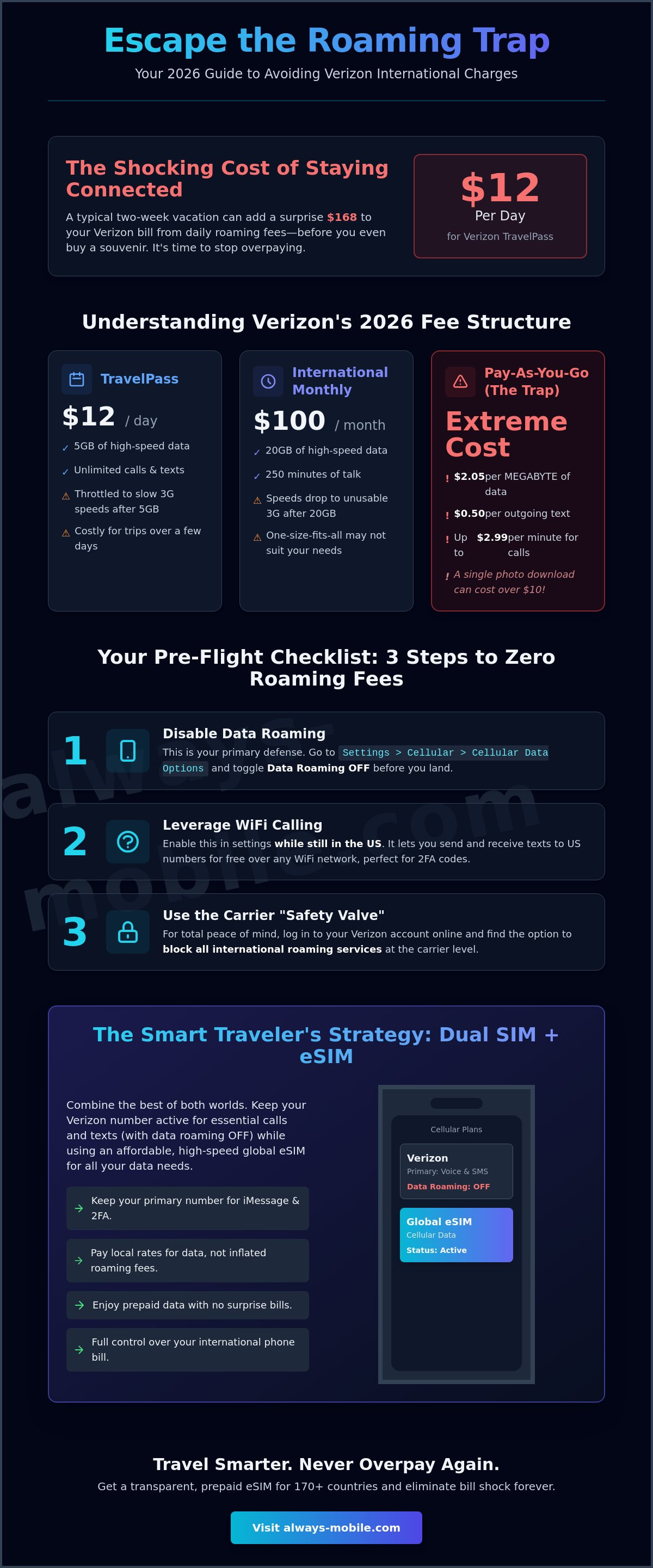
TravelPass is the most common option. In 2026, it costs $12 per day in over 210 countries. While $12 feels manageable for a weekend, it quickly becomes a financial burden. A standard three-week vacation can add $252 to your monthly statement. Verizon also offers a $100 International Monthly Plan. This plan provides 20GB of high-speed data for the entire month. It sounds like a better deal, but there is a catch. Once you hit that 20GB limit, your speeds are throttled to 3G levels. In an era of high-definition maps and video calls, 3G is practically unusable. Both plans rely on the hope that you won't track your usage closely.
The Hidden Cost of 'Pay-As-You-Go' Roaming
The real danger lies in the Pay-As-You-Go rates. If you don't have an active international plan, Verizon defaults to these standard charges. The costs are staggering. Data is billed at $2.05 per megabyte. To put that in perspective, downloading a single high-resolution photo from an email could cost you over $10. Outgoing texts cost $0.50 each, and voice calls range from $0.99 to $2.99 per minute depending on your location.
The "Extended Network" myth also traps many travelers. Some users believe that if they see "Extended" on their signal bar, the usage is included in their domestic plan. This is rarely true outside of North America. Background app refresh is the most frequent culprit for bill shock. Your phone constantly checks for updates, syncs emails, and refreshes social feeds without you touching the screen. At $2.05 per MB, your bank account can be drained in minutes while your phone stays in your pocket. Knowing these specific triggers is the first step to help you avoid verizon international charges effectively.
- TravelPass: $12/day for 5GB of high-speed data, then throttled to 3G.
- Monthly Plan: $100 for 20GB of data and 250 minutes of talk.
- Pay-As-You-Go: $2.05 per MB and up to $2.99 per minute for calls.
3 Foolproof Ways to Stop Verizon Roaming Fees Before You Land
Timing is everything. To avoid verizon international charges, you must configure your device while you're still on the tarmac or mid-flight. Once your phone pings a local tower, the $12 TravelPass trigger is already pulled. You don't want to start your vacation by disputing a charge that was technically your fault. Follow this pre-flight checklist to lock down your bill.
Step 1: Disabling Data Roaming in Cellular Settings
This is your primary defense. On an iPhone, navigate to Settings, tap Cellular, then Cellular Data Options, and toggle Data Roaming to "Off." Android users should find this under Settings, Connections, and Mobile Networks. This setting is "sticky," meaning it stays off until you manually change it. While this stops expensive data usage, it doesn't block incoming calls or texts. If you answer a call or send a single SMS, Verizon will still charge you. For total peace of mind, log into your Verizon account before you leave and use the "Safety Valve" to manually block all international roaming services at the carrier level.
Step 2: Leveraging WiFi Calling for Free Texts
WiFi Calling is a traveler's best friend. You must enable this feature in your phone's settings while you are still in the United States. This allows your phone to route calls and texts over a WiFi network instead of a cellular tower. When you're abroad and connected to a hotel or cafe network, look for the "Verizon WiFi" indicator in your status bar. This signal means you can send and receive US-based texts for free. It is the perfect way to get essential 2FA codes for banking or work without triggering a daily fee. Just remember that if the WiFi signal drops, your phone might try to reconnect to a local cell tower.
The "Nuclear Option" is keeping your phone in Airplane Mode for the entire trip. It's safe, but it makes your smartphone feel like an expensive paperweight when you're away from the hotel. To stay connected without the risk, many savvy travelers pair these settings with global eSIM plans to handle all their data needs. This strategy keeps your Verizon line quiet and your bill at zero.
Audit your settings one last time before the wheels touch the tarmac. Check that "Cellular Data Switching" is off if you're using a dual-SIM setup. This prevents your phone from accidentally jumping back to your Verizon line when the local data signal is weak. A five-minute check now prevents a three-figure headache later. It's the most effective way to avoid verizon international charges while maintaining the freedom to explore.
The Dual SIM Strategy: Keep Your Number, Skip the TravelPass
Modern smartphones have a secret weapon that carriers rarely mention. You can run two cellular plans at the same time. This is the most effective way to avoid verizon international charges without sacrificing your primary phone number. By using a Dual SIM setup, you designate your Verizon line for essential calls and texts while routing all heavy data usage through a separate, low-cost provider like Always Mobile.
What is an eSIM and Why is it the Best Solution?
An eSIM is a digital version of the physical SIM card you're used to. It's built into your phone's hardware. You don't need to find a paperclip or swap plastic chips. What is an eSIM card? It is the technology that makes instant global connectivity possible. You can download and activate a plan in minutes. Data-only eSIMs are significantly cheaper than carrier roaming because they connect directly to local networks at local rates. You pay only for what you need and nothing more.
The clever part of this strategy is a feature often called "Backup Calling" or "WiFi Calling on Cellular Data." When you disable roaming on your Verizon line but keep a data-active Always Mobile eSIM, your phone uses the eSIM's data pipe to maintain your Verizon connection. This allows you to receive iMessages and standard green-bubble texts as if you were sitting in your living room. It's the ultimate loophole. You stay reachable on your primary number for emergencies, but you never trigger that $12 daily fee.
Configuring Your Phone for Dual SIM Success
Organization prevents errors. Go to your cellular settings and label your SIMs. Name your Verizon line "Home" and your Always Mobile plan "Travel." This simple step helps you identify which line is active during a call or text. It removes the guesswork from your interface and ensures you don't accidentally dial out using the wrong provider.
Precision is your best friend. Set your "Cellular Data" default to your Always Mobile eSIM immediately. This ensures every megabyte used for GPS, social media, or email stays off Verizon's network. You must also turn off "Allow Cellular Data Switching." If this remains active, your phone might automatically revert to Verizon data if the local travel signal weakens for a split second. Locking this setting is the final step to avoid verizon international charges. You get the best of both worlds: your trusted US number and affordable, high-speed data.
Essential Settings to Audit Before Your Trip
Your phone is constantly working behind the scenes. To successfully avoid verizon international charges, you must silence the background noise. Apps like Instagram and TikTok are designed to pre-load content so it's ready when you open them. This happens even when your device is in your pocket. Go to Settings, tap General, and select Background App Refresh. Turn it off entirely or limit it to essential apps only. This prevents your Verizon line from accidentally pinging the network for a data update that triggers a daily fee.
Next, audit your cloud settings. Services like iCloud and Google Photos are data-hungry. They try to upload every photo you take to the cloud immediately. Disable "Cellular Data" for these services in your settings. Wait until you are back on hotel WiFi to sync your vacation memories. Similarly, turn off automatic app updates. A single update for a mobile game can be 500MB. That is enough to wipe out a day's worth of travel data in seconds.
Managing Background Data Consumption
Use "Low Data Mode" on iPhone or "Data Saver" on Android. This is a master switch that tells your phone to be stingy with data. It pauses non-essential tasks and reduces video quality automatically. It provides an extra layer of security to keep your usage low. You should also monitor your data in real-time. Reset your "Current Period" statistics in your cellular settings the moment you land. This gives you a live scoreboard of your usage. If you see the numbers climbing while you aren't using the phone, you know an app is still refreshing. It's a reliable way to avoid verizon international charges by catching a data leak before it becomes a bill.
Communicating via VoIP to Avoid Per-Minute Rates
Avoid traditional voice calls and SMS. Use VoIP apps like WhatsApp, Signal, or Telegram instead. These apps treat communication as data. This is much cheaper when using an Always Mobile local eSIM. You can call home for an hour and use less data than a few minutes of web browsing.
FaceTime and iMessage can be tricky. If your Verizon line is active for voice, your phone might try to use it for these services. Force them to use your eSIM data by going to Settings, then Messages, and checking your "Send & Receive" addresses. Ensure your travel eSIM data is the primary path. This keeps your conversations going without inviting a $12 daily fee. If you're an iPhone user, keep iMessage active but ensure it's linked to your email address as well. This prevents the "Green Bubble" trap where your phone tries to send a standard SMS because the data connection flickered.
Ready to secure your connection? Check out our global eSIM plans to find the perfect fit for your next destination.
How Always Mobile eSIMs Eliminate Verizon Bill Shock
Traditional roaming feels like writing a blank check to your carrier. You use your phone and hope the final bill isn't a disaster. Always Mobile changes that dynamic through prepaid certainty. You pay for your data upfront. There are no hidden fees, no "overage" surprises, and no automatic daily triggers. This is the most reliable way to avoid verizon international charges while maintaining total control over your travel budget. When your data runs low, your connection simply pauses. You decide if and when to top up.
Connectivity should be immediate. Always Mobile provides instant access to high-speed 5G and 4G networks in over 170 countries. You don't need to hunt for a local kiosk or wait for a physical SIM to arrive in the mail. By connecting directly to local infrastructure, you get the same speeds as the residents of your destination. It is a faster, more agile alternative to the throttled 3G speeds often found in standard carrier travel plans.
Local, Regional, and Global Options
Every trip has different requirements. If you are staying in one country, a local eSIM plan offers the most aggressive pricing and the fastest local speeds. Travelers heading to multiple destinations can opt for a regional eSIM plan. These are perfect for Euro-trips where you might cross three borders in a single week. You stay connected on one plan without changing settings at every frontier.
World travelers and digital nomads often prefer the convenience of global eSIM plans. These plans cover dozens of countries across multiple continents. They provide a "set it and forget it" experience for long-haul journeys. Regardless of which plan you choose, you are effectively building a digital wall around your Verizon account. You get the data you need while you avoid verizon international charges entirely.
Getting Started with Always Mobile
Preparation takes less than a minute. First, check your device compatibility on our website. Most smartphones released after 2018 support eSIM technology. Once you've confirmed your device is ready, select your destination and plan. You will receive a QR code via email instantly. Scan the code while you're still at home or using airport WiFi to install the digital profile.
The process is designed to be effortless. If you run into any issues, our 24/7 support team is available to guide you through the setup. You don't have to be a tech expert to skip the Verizon headache. You just need the right tools. Browse Always Mobile eSIM plans and save 90% on roaming today. Lock in your data costs before you leave and spend your vacation focusing on the sights, not your cellular settings.
Take Control of Your Global Connectivity
High roaming bills are now entirely optional. You have the tools to audit your settings and master the Dual SIM strategy. By separating your Verizon voice line from your mobile data, you keep your primary number active without the fear of accidental fees. It's about working smarter and keeping your travel budget for the experiences that matter.
Using a digital-first approach is the most reliable way to avoid verizon international charges while exploring the world. You get the freedom of the open road without the stress of a pending statement. Focus on your itinerary and let the technology handle the rest. It's time to stop overpaying for basic access.
Ditch the $10/day TravelPass and get an Always Mobile eSIM today. Benefit from instant digital activation and high-speed data in over 170 countries. Our plans are entirely prepaid with no hidden fees or surprise costs. Travel with confidence and stay connected on your own terms.
Frequently Asked Questions
Does Verizon charge for receiving texts internationally?
Yes, Verizon charges $0.05 to receive a standard text message if you are on a Pay-As-You-Go rate without an active international plan. Sending a text is even more expensive at $0.50 per message. If you have an active TravelPass or the International Monthly Plan, these texts are included in your flat fee. To bypass these costs entirely, use WiFi Calling or a data-based messaging app like WhatsApp while connected to a travel eSIM.
Will I get charged if I turn off data roaming but leave my phone on?
You won't be charged for data, but you can still trigger a $12 daily fee for calls or texts. Turning off data roaming only prevents your phone from using cellular data for apps and web browsing. If you answer an incoming call or send a single SMS, Verizon will automatically activate your TravelPass for the next 24 hours. Keep your phone in Airplane Mode to ensure no charges occur.
How do I use my Verizon number with an eSIM for data?
You must configure your device to use your Verizon line for voice and your eSIM for all cellular data. Go to your cellular settings and set the "Cellular Data" default to your travel eSIM. Keep your Verizon line "On" but ensure data roaming is disabled for that specific line. This is the most efficient way to avoid verizon international charges while keeping your primary number reachable for essential alerts.
Can I use iMessage abroad without a Verizon international plan?
Yes, iMessage works perfectly without a Verizon plan as long as you have a data connection. Because iMessage uses the internet rather than the cellular SMS network, it can run over WiFi or a secondary eSIM data plan. Just make sure your iMessage settings are configured to use your email address or your travel data line. This prevents the phone from falling back to a standard SMS that triggers roaming fees.
What happens if I accidentally use data without a plan on Verizon?
Verizon will bill you at the standard Pay-As-You-Go rate of $2.05 per MB. This can lead to extreme bill shock because background apps can consume hundreds of megabytes in minutes. A single gigabyte of accidental usage would cost over $2,000 at these rates. If you notice an error, immediately enable Airplane Mode and verify that your Verizon data roaming toggle is switched to the off position to stop the drain.
Is Verizon TravelPass worth it for a two-week trip?
TravelPass is rarely the best value for a 14-day journey. At $12 per day, a two-week trip adds $168 to your monthly statement. You can typically purchase a regional or global eSIM plan for a small fraction of that price. TravelPass is a convenient option for a one-day layover, but for longer trips, the cumulative cost makes it one of the most expensive ways to stay connected abroad.
How do I enable WiFi calling on Verizon before I travel?
Open your phone settings, select "Cellular," tap your Verizon line, and toggle "Wi-Fi Calling" to the on position. You must do this while you are still in the United States and connected to the Verizon network. Once enabled, your phone will route calls and texts over WiFi instead of local cell towers. This setup helps you avoid verizon international charges by treating your connection as if you were still at home.
Will an eSIM delete my Verizon SIM card info?
No, an eSIM will not delete or overwrite your Verizon SIM card information. Your phone is capable of managing multiple SIM profiles at once. Your physical Verizon SIM stays in its slot while the eSIM functions as a digital secondary line. You can easily switch between them in your cellular settings. This allows you to keep your Verizon number for emergencies while using a separate plan for affordable high-speed data.