

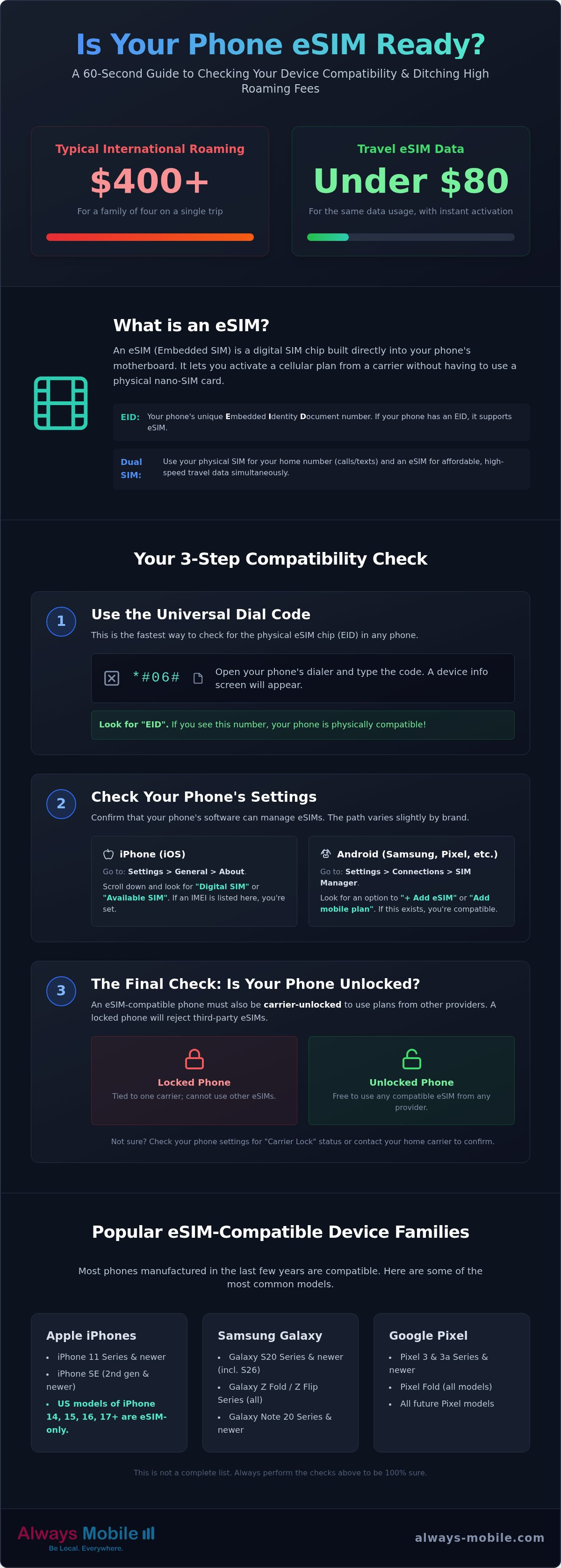
A family of four can spend over $400 on international roaming passes for a single trip, yet a travel eSIM provides the same data for under $80. The only barrier to these savings is knowing if your hardware is ready for the switch. It's frustrating to deal with technical jargon like EID and IMEI when you just want to know if your phone will work abroad. You don't want to risk buying a plan that fails to activate because of a hidden carrier lock or an incompatible chipset.
Learning how to check if my phone supports esim is the first step toward stress-free travel. This guide shows you exactly how to verify your device's compatibility in under 60 seconds. We'll walk through the specific steps for the latest 2026 models and older devices alike. You'll get a definitive answer on your phone's status so you can ditch roaming fees forever and enjoy instant connectivity the moment you land. We'll cover everything from simple USSD codes to menu settings for both iPhone and Android users.
Key Takeaways
- Use a simple universal dial code to learn how to check if my phone supports esim in seconds without digging through complex menus.
- Identify your device's EID to confirm the presence of a built-in eSIM chip before you purchase a digital data plan.
- Verify your carrier lock status to ensure your phone is ready to accept third-party travel eSIMs and avoid activation failures.
- Review the comprehensive 2026 compatibility list featuring the newest iPhone 17, Samsung Galaxy S26, and Google Pixel models.
- Transition seamlessly from hardware verification to choosing the right local or regional eSIM plan for over 170 countries.
What is an eSIM and Does Your Phone Have One?
An eSIM is a digital-only SIM that allows network switching without physical cards. It represents the next evolution in mobile connectivity. Unlike traditional plastic chips, an eSIM is an "Embedded SIM" chip soldered directly into your phone's motherboard. You can't remove it; it's a permanent part of your device's internal hardware. This design eliminates the need to carry SIM ejector tools or worry about losing tiny pieces of plastic while traveling.
Every eSIM chip has a unique identifier called an EID, or Embedded Identity Document. Consider the EID as the digital serial number for your phone's internal SIM. When you activate a travel plan, the network uses this EID to recognize your device. If you're trying to figure out how to check if my phone supports esim, the presence of an EID in your settings is your most reliable "yes." Without this digital fingerprint, your phone cannot host a digital profile.
Most users worry that switching to digital means losing their physical SIM slot. This isn't the case. Most modern smartphones offer Dual SIM functionality. You can keep your physical card from home for calls and texts while using the eSIM for high-speed local data. It's a seamless way to avoid roaming fees without losing access to your primary number. You get the reliability of your home carrier and the affordability of local networks simultaneously.
Why Hardware Compatibility Matters for Travelers
Checking your hardware before you buy a plan is essential. If your device lacks the necessary chip, you'll face the dreaded "No SIM" error when trying to install a travel profile. Data-only eSIMs rely on specific hardware triggers to connect to local networks in over 170 countries. Understanding these triggers ensures your connection works the moment you land. For a full breakdown of the tech specs, see our guide on device compatibility and learn why digital is the smarter choice for 2026.
The Difference Between eSIM Hardware and Software
True compatibility requires two things to work in harmony. Hardware is the physical EID chip inside your phone. Software is your phone's operating system (iOS or Android) and its ability to manage digital profiles. Some older devices might have the chip but lack the software updates to run it. Determining how to check if my phone supports esim involves verifying both of these components. You need both to use Always Mobile's local and global plans effectively. To see how this technology has matured, you can read more about What is an eSIM on Wikipedia. This history explains why modern devices are moving away from physical slots entirely.
3 Fastest Ways to Check eSIM Compatibility (iPhone & Android)
You don't need a degree in computer science to verify your hardware. Most travelers ask how to check if my phone supports esim simply to escape the high costs of traditional roaming. You can find the answer in less than a minute using one of three proven methods. These shortcuts work across almost all modern brands, including the latest 2026 releases. If your phone was manufactured in the last few years, there's a high probability it's already equipped with this technology.
Method 1: The 'Magic' Dial Code (*#06#)
Open your phone's dialer app. Type *#06#. You don't even need to press the call button. A screen will pop up with several barcodes and long strings of numbers. Look specifically for a section labeled "EID." This stands for Embedded Identity Document. If this number is present, your phone contains the physical chip necessary to host a digital profile. This universal check is possible because of the global specification by the GSMA, which standardizes how digital SIMs are identified worldwide. If you don't see an EID, your device likely lacks the internal hardware required for an eSIM.
Method 2: Checking iOS Settings (iPhone 11 to iPhone 17)
Navigate to Settings, tap General, and then select About. Scroll down toward the bottom of the page. You are looking for a section titled "Available SIM" or "Digital SIM." If you see an IMEI number listed there, your iPhone is compatible. Remember that every iPhone model sold in the US from the iPhone 14 through the current iPhone 17 Pro Max is eSIM-only. These devices lack a physical tray entirely, making them 100% compatible by design. For older models like the iPhone 11 or 12, this settings check is the most reliable way to confirm status.
Method 3: Checking Android Settings (Samsung, Pixel, etc.)
The path varies slightly by brand but remains simple. For Samsung Galaxy or Google Pixel users, open your Settings and search for "SIM Manager" or "Mobile Network." On most Samsung devices, you'll find this under Connections. Look for an option that says "Add eSIM" or "Add Mobile Plan." If that button exists, your software and hardware are ready to go. This is the fastest way to confirm how to check if my phone supports esim on an Android interface. If the option is greyed out, your phone might be locked to a specific carrier, which we will address in the next section.
Don't forget your other devices. Many cellular-model iPads and Android tablets also support digital profiles. Check the "About" section in your tablet settings just as you would for a phone. If you see an EID, that device can also run a travel data plan. After confirming your device is ready, you can explore local and global data plans to ensure you stay connected without the physical SIM swap.
The Hidden Obstacle: Is Your Phone Carrier Unlocked?
Confirming how to check if my phone supports esim hardware is only your first victory. A device can have the correct internal chip but still reject a travel data plan. This happens when your phone is "locked" to a specific provider like AT&T, Verizon, or T-Mobile. If your device is under a payment plan or contract, the carrier often restricts it from using other networks. Always Mobile's local and global eSIMs require an unlocked device to function. If you skip this check, your new data profile will fail to activate the moment you land.
Checking your lock status on an iPhone is straightforward. Navigate to Settings, tap General, and then select About. Scroll down until you find the "Carrier Lock" section. If it says "No SIM restrictions," your phone is ready for any digital plan. If it displays a specific carrier's name, you must contact them before you leave. Android users can usually find this under "Network Lock" or "Service Provider Profile" in their connection settings. "No SIM restrictions" is the only status that guarantees your travel eSIM will work.
How to Request an Unlock from Your Provider
Most carriers will release your device if you meet specific criteria. You don't have to be a tech expert to handle this. Contact your provider's customer support and request a "device unlock" for international travel. They generally require the following:
- The device must be fully paid off.
- The account must have been active for at least 60 days.
- The phone must not be reported as lost, stolen, or blacklisted.
A blacklisted phone is different from a locked one. Blacklisting means the device is blocked globally due to theft or unpaid bills. A locked phone is simply restricted to one network. Once the carrier processes your request, they "release" your EID, allowing you to install Always Mobile profiles instantly.
Why Roaming is Often a Lock Trap
Carriers have a financial incentive to keep your phone locked. They want you to use their expensive international day passes instead of affordable local alternatives. As of June 2026, major US carriers charge approximately $12 per day for international roaming. A 14-day trip can cost you $168 per line. In contrast, a travel eSIM for the same duration often costs between $15 and $20. For a family of four, the difference is massive. You could spend over $400 on carrier roaming or under $80 with a digital plan. Understanding Prepaid eSIM vs. Roaming helps you see exactly how much you can save by taking 60 seconds to unlock your device. Don't let a software lock dictate your travel budget.
Comprehensive 2026 eSIM Compatible Device List
Device compatibility evolves every few months as new hardware hits the market. If you're still wondering how to check if my phone supports esim, matching your model against a verified list is the final step. Most flagship phones released in the last five years include the necessary internal chip. By 2026, digital SIM technology has become the industry standard for all major manufacturers. If you own a premium device from Apple, Samsung, or Google, you likely already have everything you need to connect.
- Apple: Every model from the iPhone XS and iPhone 11 through to the latest iPhone 17 Pro Max. This includes all versions of the iPhone 12, 13, 14, 15, and 16, as well as the iPhone SE (2nd and 3rd Gen).
- Samsung: The Galaxy S20 series through to the current Galaxy S26 series. It also includes every Galaxy Z Fold and Z Flip model released since 2020.
- Google Pixel: Every device from the Pixel 4 through to the Pixel 10 and its Pro variants.
- Other Manufacturers: The Motorola Razr (2019 and newer), Sony Xperia 1 and 5 series (recent models), and various Xiaomi and Oppo flagship devices.
The Rise of eSIM-Only Phones
The industry is moving toward a digital-only future. Every iPhone model sold in the United States from the iPhone 14 through the iPhone 17 has no physical SIM slot. These devices rely exclusively on digital profiles. This shift makes Always Mobile's digital-first approach essential for modern travelers. You can't use a traditional plastic card even if you wanted to. For real-time updates on the latest 2026 releases, visit the Always Mobile device compatibility page to see if your new upgrade is supported.
Tablets and Wearables
Compatibility extends beyond your primary phone. Most iPad Pro and iPad Air models with cellular support can run digital data profiles. Modern laptops like the Microsoft Surface series and certain Lenovo Yoga models also include an EID for mobile data. When learning how to check if my phone supports esim, remember that these same rules apply to your tablet. However, our plans are currently optimized for smartphones and tablets. We do not support Apple Watches or other wearables at this time. Ready to see the savings for yourself? View our full range of eSIM plans by destination and start your journey today.
Ready to Connect? Choosing Your Travel eSIM Plan
You've mastered how to check if my phone supports esim. Now comes the easy part: choosing your plan. Your hardware is ready, so you just need to match a data package to your itinerary. Always Mobile offers options for 170+ countries. This variety ensures you never pay for data you don't need. Whether you're heading to a single city or crossing continents, there's a digital solution waiting for you.
- Local eSIM Plans: These are the most cost-effective choice for single-country trips. If you're spending two weeks in Japan or touring Spain, these plans connect you directly to local 4G/5G networks. You get the lowest latency and the best local rates available.
- Regional eSIM Plans: Planning to hop across borders? Regional eSIMs are built for travelers visiting multiple countries in one trip. A single European regional plan covers you from London to Rome without needing to switch profiles. This is the ultimate solution for backpackers in Southeast Asia or business travelers moving across the EU.
- Global eSIM Plans: For those on multi-continent adventures, Global eSIMs provide a "set it and forget it" experience. You can land in Dubai, fly to New York, and then head to Sydney without ever losing your connection. It's the smarter alternative to juggling multiple physical cards.
How to Install Your First eSIM Instantly
Installation is entirely digital. Once you purchase a plan, you receive a QR code via email immediately. Scan it using your phone's camera or upload it through your cellular settings. Your device handles the rest. We recommend installing your eSIM while on Wi-Fi at home or at the airport before you depart. This ensures your data is active the moment your plane touches the tarmac. There are no physical tools required and no tiny plastic cards to lose.
Manage Multiple Profiles for Future Travel
One of the biggest benefits of knowing how to check if my phone supports esim is the ability to manage multiple digital identities. You can keep your primary home SIM active for incoming SMS and emergency calls while using Always Mobile for all your internet needs. This dual-setup prevents accidental roaming charges on your main line. Switching between different regional plans is as simple as a single tap in your cellular settings. You can store several profiles on your device and toggle them on as needed for each new destination. Explore our Global eSIM packages for your next adventure and experience the freedom of modern connectivity.
Connect Instantly on Your Next Trip
You now have the tools to verify your device in under 60 seconds. Whether you use the universal dial code to find your EID or navigate through your phone's settings, the path to digital connectivity is clear. Remember that hardware is only half the battle; ensuring your device is carrier-unlocked is the final step toward total freedom from high roaming costs. You've successfully learned how to check if my phone supports esim, and the technical hurdles are behind you.
Always Mobile provides instant digital delivery and high-speed local 4G/5G networks in 170+ countries. You don't have to deal with hidden roaming fees or the frustration of physical SIM swapping ever again. It's time to enjoy the seamless, stress-free travel experience you deserve. Check Your Device & Grab a Travel eSIM Plan today. Your next global adventure is just a scan away.
Frequently Asked Questions
Can I check if my phone is eSIM compatible without an app?
Yes, you don't need to download anything to learn how to check if my phone supports esim. Simply open your phone's dialer and type *#06# to see your EID number instantly. Alternatively, you can find this information in your device's "About" or "SIM Manager" settings. These built-in tools are the most reliable ways to verify your hardware without third-party software.
What should I do if my phone has an EID but says 'SIM Not Supported'?
An EID confirms your hardware is ready, but "SIM Not Supported" means your software is locked to a specific carrier. You must contact your current provider to request a device unlock. Once they release the restriction, you can install digital profiles from other providers. This is a common hurdle for phones still under a monthly payment contract or recent upgrade plan.
Does my phone need to be unlocked to use a travel eSIM?
Yes, your device must be carrier-unlocked to use any travel data plan. A locked phone is restricted to its original network and will reject Always Mobile's local or global profiles. Verify your status in your iPhone's "Carrier Lock" settings or by calling your service provider. Unlocking your phone is the only way to bypass expensive international roaming fees.
Is iPhone 11 compatible with eSIM in 2026?
Yes, the iPhone 11 remains fully compatible with digital profiles in 2026. It was one of the first models to feature Dual SIM technology, allowing you to run one physical card and one digital profile simultaneously. While newer US models like the iPhone 17 are eSIM-only, your iPhone 11 provides the flexibility of using both traditional and modern connectivity options.
How do I know if my Android phone supports eSIM?
Look for the "Add eSIM" option in your connection settings to determine how to check if my phone supports esim on Android. Navigate to Settings, then Connections, and select SIM Manager. If you see an option to add a mobile plan or a digital SIM, your device is ready. Google Pixel and Samsung Galaxy flagship models from the last five years typically include this feature by default.
Can I use an eSIM and a physical SIM at the same time?
Yes, you can use both simultaneously through Dual SIM technology. This allows you to keep your primary physical SIM active for important calls and texts from home while using a digital plan for high-speed local data. You can toggle between these profiles in your settings at any time. It's the most efficient way to stay connected without swapping physical cards.
Why doesn't my EID show up when I dial *#06#?
If the EID doesn't appear after dialing *#06#, your phone likely lacks the physical eSIM chip. This is common in older budget models or certain international versions of flagship devices. Without this internal hardware, your phone cannot host a digital profile. You can verify your specific model number against our compatibility list to be certain of your device's capabilities.
Will using an eSIM delete my current phone plan?
No, installing a travel profile will not affect your existing phone plan. It simply adds a secondary data line to your device. You can choose which plan to use for cellular data in your settings while keeping your home number active for incoming messages. Your primary subscription remains exactly as it was; you won't lose your number or service while abroad.