

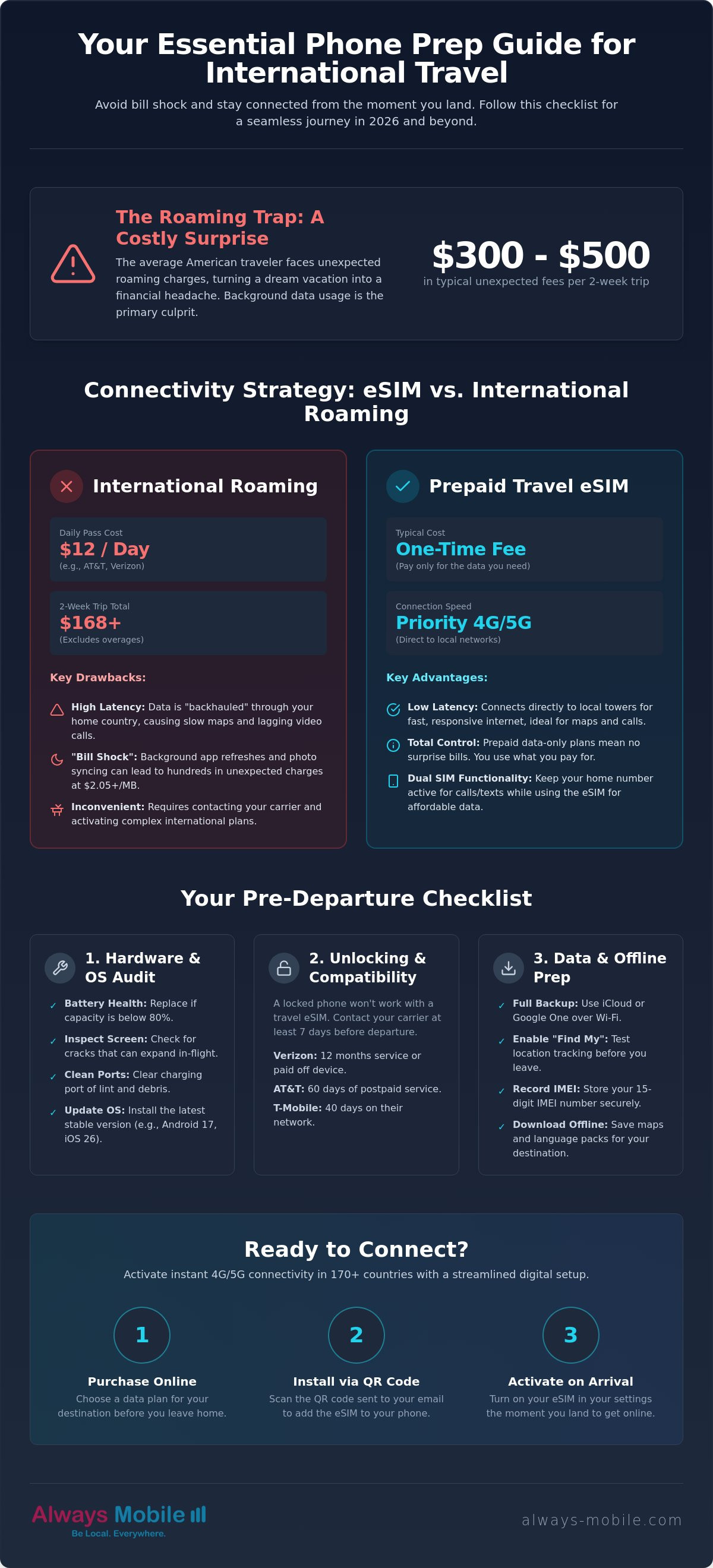
Did you know the average American traveler faces between $300 and $500 in unexpected roaming charges after just a two-week vacation? It's a staggering cost for a service that should be simple. We understand the anxiety of landing in a foreign city without working maps or the fear of a massive bill waiting in your inbox. You want to focus on your journey, not your data roaming settings. Learning how to prepare your phone for international travel is now the most critical part of your 2026 trip planning.
Follow this expert-led checklist to ensure your phone is secure, powered, and connected the moment you land. We provide the specific steps needed to avoid "bill shock" and resolve the confusion over eSIM technology. You'll learn how to navigate the latest Android 17 and iOS 26 updates, manage new border search regulations, and secure instant internet access. We break down complex carrier unlocking policies into clear, sequential actions. This guide ensures you arrive with a functional device and total peace of mind. Stop worrying about connectivity and start enjoying your destination.
Key Takeaways
- Audit your hardware and verify eSIM compatibility to prevent technical failures before you depart.
- Learn how to prepare your phone for international travel by replacing high-cost roaming with flexible, data-only eSIM plans.
- Secure your sensitive data at borders and on public Wi-Fi using specialized "Travel Mode" settings and privacy audits.
- Ensure continuous navigation and communication by downloading offline maps and language packs for your destination.
- Activate instant 4G/5G connectivity across 170+ countries with a streamlined, five-minute digital setup.
Table of Contents
-
The Foundation: Essential Hardware and Software Fundamentals
-
Connectivity Strategy: Prepaid eSIM vs. International Roaming
The Foundation: Essential Hardware and Software Fundamentals
Your phone is your primary tool for navigation, communication, and safety. Before you pack your bags, you must ensure the hardware can handle the journey. Start with a physical audit. Inspect your screen for small cracks that could expand during pressure changes in flight. Check your battery health in your device settings. If your maximum capacity is below 80%, consider a replacement before you leave. A failing battery is a major liability when you rely on digital maps in a new city. Finally, clean your charging port using compressed air or a non-metallic pick. Compressed pocket lint is the leading cause of charging failure during international transit.
Software readiness is equally vital. Update your operating system to the latest versions to access the most stable network protocols. As of July 2026, your device should be running Android 17 or iOS 26. These versions include critical security patches and improved power management for 5G roaming. This software preparation is a vital step in how to prepare your phone for international travel. It ensures your device remains compatible with modern digital networks across the globe.
Device Compatibility and Unlocking
A locked phone is a restricted phone. If your device is tied to a specific carrier, you cannot activate a travel eSIM. Check your lock status in the "About" section of your settings menu. If it shows a "SIM Locked" status, you must contact your provider. Most U.S. carriers have updated their policies for 2026. Verizon now often requires 12 months of active service or a fully paid-off balance. AT&T requires 60 days for postpaid devices, while T-Mobile typically requires 40 days. Request an unlock at least seven days before your flight to avoid last-minute delays. Use the Always Mobile compatibility guide to verify if your specific model supports digital plans. This allows you to bypass expensive roaming fees by using a dedicated travel data plan instead.
Cloud Backups and Software Prep
Data loss can ruin a trip. Perform a full backup to iCloud or Google One while connected to your home Wi-Fi. This ensures your photos, contacts, and travel documents are safe if your device is lost or damaged. Enable "Find My Device" and test the location tracking feature. Write down your 15-digit IMEI number and store it in a secure cloud document or a physical notebook. You will need this code to report a stolen device or file an insurance claim abroad. Please verify the exact timestamp of your last successful backup before you head to the airport.
Connectivity Strategy: Prepaid eSIM vs. International Roaming
Landing in a new country without a functional data plan is a recipe for immediate stress. You need a connectivity strategy before you board your flight. Most travelers default to their home carrier's roaming options, but this is often the most expensive path. In 2026, major U.S. carriers like AT&T and Verizon charge $12 per day for an international pass. For a two-week vacation, that totals $168 per person. If you fail to add a specific plan, pay-per-use data rates can climb to $2.05 or even $2.99 per megabyte. Understanding these costs is a vital part of how to prepare your phone for international travel.
Data-only eSIMs offer a technical advantage that traditional roaming cannot match. Roaming traffic is typically "backhauled" through your home country, which creates significant latency. This results in lagging video calls and slow-loading maps. A local eSIM connects you directly to the destination's network infrastructure, often granting you 5G priority. You get faster response times and a more reliable connection for a fraction of the carrier's price. Modern devices also allow for a "Dual SIM" setup. You can keep your home SIM active to receive essential SMS verification codes while using your travel eSIM for all data-heavy tasks. This prevents accidental charges while keeping you reachable.
The Hidden Pitfalls of Roaming
The average American traveler faces $300 to $500 in unexpected fees after a two-week trip. This "bill shock" is usually caused by background app refresh. Your phone silently downloads software updates and syncs high-resolution photos to the cloud while it sits in your pocket. At roaming rates, these background tasks consume your travel budget in minutes. Latency issues also plague roaming users, making the internet feel sluggish even when you have a full signal. For a complete breakdown of these expenses, read our guide on Prepaid eSIM vs. Roaming.
Benefits of Digital SIM Cards
Digital SIMs provide immediate relief and total control. You don't have to hunt for sketchy airport Wi-Fi or wait in long lines at local SIM kiosks. You can purchase and install your plan before you leave, ensuring you have internet the second the plane touches down. Security is another major benefit. Because an eSIM is embedded in your hardware, it cannot be physically lost or stolen like a traditional plastic card. You can explore local eSIM plans to find targeted savings for your specific destination. If your itinerary includes multiple countries, you can browse global data options to stay connected across borders without switching plans.
Securing Your Digital Footprint for International Borders
Data privacy is a critical concern when crossing international borders. In fiscal year 2025, U.S. Customs and Border Protection (CBP) conducted 55,318 electronic device searches. This represented a 17.6% increase from the previous year. Under current directives, officers can perform a "basic search" by manually reviewing files, photos, and messages stored on your device without a warrant. They may also ask for your password. Refusal can lead to device detention or admissibility issues for non-citizens. Understanding these procedures is a central part of how to prepare your phone for international travel. You must balance the need for connectivity with the necessity of digital hygiene.
Create a secondary "travel user" profile if your device supports multiple accounts. This allows you to present a clean interface without access to your primary photo library or sensitive work documents. For essential apps like banking or work email, implement a "Travel Mode" by moving them into secure folders or using app-lock features. Review your privacy settings to limit data sharing with third-party services. Clear your browser history and log out of sensitive accounts before you reach the customs hall. These steps ensure your most private information remains inaccessible during routine inspections.
Encryption and Access Control
Modern smartphones utilize full-disk encryption by default. This ensures that your data remains scrambled and unreadable without the correct decryption key. However, your encryption is only as strong as your passcode. Replace simple 4-digit PINs with a complex alphanumeric password. These are significantly harder for unauthorized parties to guess or bypass. Temporarily disable biometric unlock features like FaceID or Fingerprint sensors before you enter a port of entry. This prevents your phone from being unlocked simply by being held up to your face. You should maintain absolute control over when your device is accessed.
VPNs and Public Wi-Fi Safety
Public Wi-Fi networks in airports, cafes, and hotels are prime targets for data interception. Rogue hotspots often mimic legitimate network names to trick travelers into connecting. Go to your settings and enable "Ask to Join Networks" to prevent your phone from connecting to these hotspots automatically. A VPN is a secure tunnel for your travel data that encrypts your internet connection. It protects your passwords and personal details from being "sniffed" by other users on the same network. Install a reputable VPN service before you depart. This ensures your digital footprint stays private while you navigate unfamiliar networks abroad.
Optimizing Your Phone for Offline Utility
A reliable data connection is your primary goal, but offline preparation is your essential safety net. Even the best networks have dead zones, such as underground metro stations or remote rural paths. You don't want to be stranded without a map when you lose a signal. Learning how to prepare your phone for international travel involves creating a robust offline ecosystem that functions without a single bar of service. This proactive approach saves your battery and ensures you never feel lost in an unfamiliar city.
Start with your navigation. Open Google Maps or Apple Maps and search for your destination city. Use the "Download" feature to save the entire metropolitan area to your device storage. This allows you to search for points of interest and receive turn-by-turn driving directions without using any cellular data. Do the same for language packs. Download the local language in your preferred translation app. This enables real-time text and voice translation even when you are completely offline. You should also move your essential travel documents into your digital wallet or a dedicated offline folder. Save PDF copies of your flight itinerary, hotel vouchers, and travel insurance details. Having these files locally ensures you can present them at check-in desks regardless of your connectivity status.
Entertainment is another major data drain. Sync your favorite playlists, movies, and podcast episodes while you are still on your high-speed home Wi-Fi. This preserves your travel data for actual utility, like finding a restaurant or calling a ride-share. If you haven't secured your data plan yet, get a prepaid eSIM now to ensure you have high-speed 4G/5G access the moment you land.
The Offline Survival Kit
Build a digital survival kit to handle connectivity gaps. Your kit should include "Offline Areas" in Google Maps that cover your hotel and major transit hubs. One critical step is to save your eSIM installation QR code as a screenshot. If you lose access to your email, you can still scan the code from your photo gallery to activate your plan. Ensure your airline and local transit apps have "Offline Mode" enabled. This keeps your boarding passes and digital tickets accessible at all times. These small steps remove the friction from your arrival process.
Storage Management
A "Storage Full" notification is a traveler's worst nightmare. Clear out old photos, videos, and large message attachments before you depart. This makes room for thousands of new memories. Go to your settings and offload unused apps. This removes the app data but keeps your settings, preventing them from trying to update over expensive cellular networks. Check your camera settings and ensure they are set to "High Efficiency" (HEIF/HEVC) format. This modern standard cuts file sizes in half without sacrificing image quality. You want a device that is lean, fast, and ready to capture every moment of your journey.
Ready to Connect? The 5-Minute Setup with Always Mobile
Finalize your travel preparation with a seamless digital connection. You have audited your hardware and secured your digital footprint. Now, execute the final step in how to prepare your phone for international travel by activating your data plan. Always Mobile removes the friction from this process. You don't need to visit a retail store or wait for a physical package. Everything happens digitally. This ensures you are ready to navigate, translate, and share your journey the second your plane touches the tarmac.
Start by selecting your plan based on your specific itinerary. Purchase your data package through the secure checkout. You will receive an activation QR code via email instantly. We recommend installing the eSIM while you are still on your home Wi-Fi, ideally the night before you depart. The plan remains dormant and does not "count down" until it connects to a supported network in your destination. This proactive setup eliminates last-minute stress at the departure gate. You can board your flight knowing your connectivity is already handled.
Selecting the Right Plan for Your Trip
Match your data needs to your travel style to maximize value. Use Regional eSIM Plans if you are crossing multiple borders, such as a multi-city European tour. These plans allow you to stay connected on a single profile as you move between countries. For world tours or long-term nomadic travel, consider Global eSIM Plans to maintain coverage across 170+ countries. If your trip involves heavy video streaming, remote work, or frequent social media uploads, check our Daily Unlimited Plans. These options provide the highest utility for data-heavy users without the risk of hitting a cap.
The Landing Protocol
Execute a simple three-step protocol once the aircraft lands. First, go to your phone's cellular settings and switch your "Cellular Data" line to the Always Mobile eSIM. Second, toggle the "Data Roaming" switch to "On" for the eSIM line only. Keep your primary home line active for "Voice" if you need to receive urgent SMS verification codes or 2FA texts. This dual-SIM configuration keeps you reachable on your home number while routing all expensive data traffic through your affordable travel plan. Finally, test your connection by loading a local map or news site. You are now instantly connected to a high-speed 4G or 5G network. Enjoy your trip with the confidence of a tech-savvy traveler.
Take Control of Your Digital Travel Experience
Mastering how to prepare your phone for international travel ensures your focus stays on the journey, not your data settings. You have audited your hardware, hardened your digital security for border crossings, and optimized your apps for offline utility. By shifting from high-cost carrier roaming to a flexible digital strategy, you eliminate the risk of "bill shock" while gaining superior local network priority. Your device is now a secure, efficient tool ready for any destination on your 2026 itinerary.
Global connectivity should be the simplest part of your packing list. Always Mobile offers coverage in 170+ countries with 24/7 digital delivery, so you never have to worry about physical SIM swapping or finding a local kiosk. You can manage your data needs with total transparency and zero friction. Get connected instantly with Always Mobile travel eSIMs and land with the confidence of a fully prepared traveler. Safe travels on your next adventure.
Frequently Asked Questions
Can I use my WhatsApp number with a travel eSIM?
Yes, you can keep your existing WhatsApp number while using a travel eSIM for data. WhatsApp identifies your account through your primary phone number, not your internet connection. Don't change your number when the app prompts you. This ensures all your chats and contacts remain exactly where they are while you use your new data plan for connectivity.
Do I need to remove my physical SIM card to use an eSIM?
Keep your physical SIM card in its slot. Modern phones use Dual SIM technology to run both lines simultaneously. Simply set your travel eSIM as the primary source for cellular data in your device settings. This allows you to receive incoming texts on your home number while avoiding expensive data roaming charges on that same line.
What happens if I run out of data while I'm traveling?
For fixed-data eSIM plans, top up your data by following the link provided to you to access your eSIM portal. You don't need to install a new eSIM or change any settings to add more gigabytes. Most plans offer real-time usage tracking so you can monitor your balance before it hits zero. This is a critical part of how to prepare your phone for international travel; always know where to find your top-up options before you leave. Our Daily Unlimited eSIM plans cannot be topped-up.
Will an eSIM work if my phone is still under a carrier contract?
An eSIM only works if your device is software-unlocked by your carrier. Being under a financial contract doesn't always block eSIM usage, but the carrier must have released the SIM lock. Contact your provider to verify your unlock status at least a week before departure. As discussed earlier, carriers like Verizon and AT&T have specific time requirements for unlocking devices.
Can I use my phone as a hotspot with a travel eSIM?
Yes, our travel eSIM plans support personal hotspots. This allows you to share your high-speed 4G or 5G connection with your laptop, tablet, or other travel companions. It's an efficient way to keep all your devices connected without purchasing multiple plans. Check your specific plan details to confirm hotspot compatibility before you finalize your purchase.
How do I know if my phone is compatible with eSIM technology?
Check your settings for an "EID" number or the "Add eSIM" option in your cellular menu. Most flagship devices released after 2020 support this technology. If you see an EID listed under your device information, your hardware is ready. You can also use our compatibility guide to verify your specific model before you commit to a plan.
Should I install my travel eSIM before I leave or when I arrive?
Install your eSIM while you are still at home on a stable Wi-Fi connection. The installation process requires an active internet signal to register with the global network. The plan stays dormant and won't begin its validity period until it connects to a supported local tower at your destination. This ensures you have instant internet the moment the plane touches down.
Are travel eSIMs safer than using public Wi-Fi in hotels?
Travel eSIMs are significantly more secure than public Wi-Fi networks. Cellular connections use advanced encryption protocols that are much harder to intercept than open hotel or airport hotspots. Using a private data plan reduces your exposure to "man-in-the-middle" attacks and data theft. It's the smarter choice for accessing banking apps or sensitive work emails while you are abroad.