

You're standing on a crowded street corner in Paris, trying to load a walking route, but your screen remains blank. Despite paying for a premium roaming tier, you're hit with t-mobile international plan slow speeds that barely support a simple text message. It's a common, frustrating reality for global travelers who expect their phone to work as well abroad as it does at home. You shouldn't have to worry about getting lost or losing access to essential apps just because you crossed a border.
We know how it feels to regret a $50 data pass that delivers dial-up performance. The truth is that T-Mobile often defaults to a sluggish 256 Kbps speed once your high-speed bucket is empty. This guide explains why these bottlenecks happen and how you can reclaim high-speed 4G or 5G data instantly. We will show you how to avoid future roaming headaches by switching to a more efficient, digital-first solution that offers 10x faster speeds without the traditional carrier baggage.
Key Takeaways
- Identify the root causes of t-mobile international plan slow speeds, including plan-specific throttling and the latency created by routing data back to the USA.
- Learn how to use "Low Data Mode" and other technical quick fixes to optimize your current connection when roaming data feels sluggish.
- Compare the costs and performance of traditional carrier passes against local eSIM plans to ensure you get the best value for your trip.
- Discover how to bypass "Guest" network status and access native 5G speeds in over 170 countries for a seamless travel experience.
Table of Contents
Why Your T-Mobile International Plan Feels So Slow
Connecting abroad should feel seamless. For many T-Mobile customers, however, it is a struggle against t-mobile international plan slow speeds. This lag is rarely a single technical glitch. Instead, it is a combination of intentional throttling and routing latency. Understanding how roaming works helps clarify why your phone feels stuck in the past the moment you land. When you roam, your data is not just jumping to the nearest tower; it is engaging in a complex, multi-step handshake between your home carrier and a local provider.
Plan Anxiety is a real phenomenon for modern travelers. It is that sinking feeling when your maps won't load in a foreign city or your ride-share app times out. You see the signal bars, but you don't have the data. This happens because T-Mobile often prioritizes cost-saving routing over the immediate user experience, leaving you stranded with a spinning loading icon when you need connectivity the most.
The Hidden 5GB High-Speed Limit
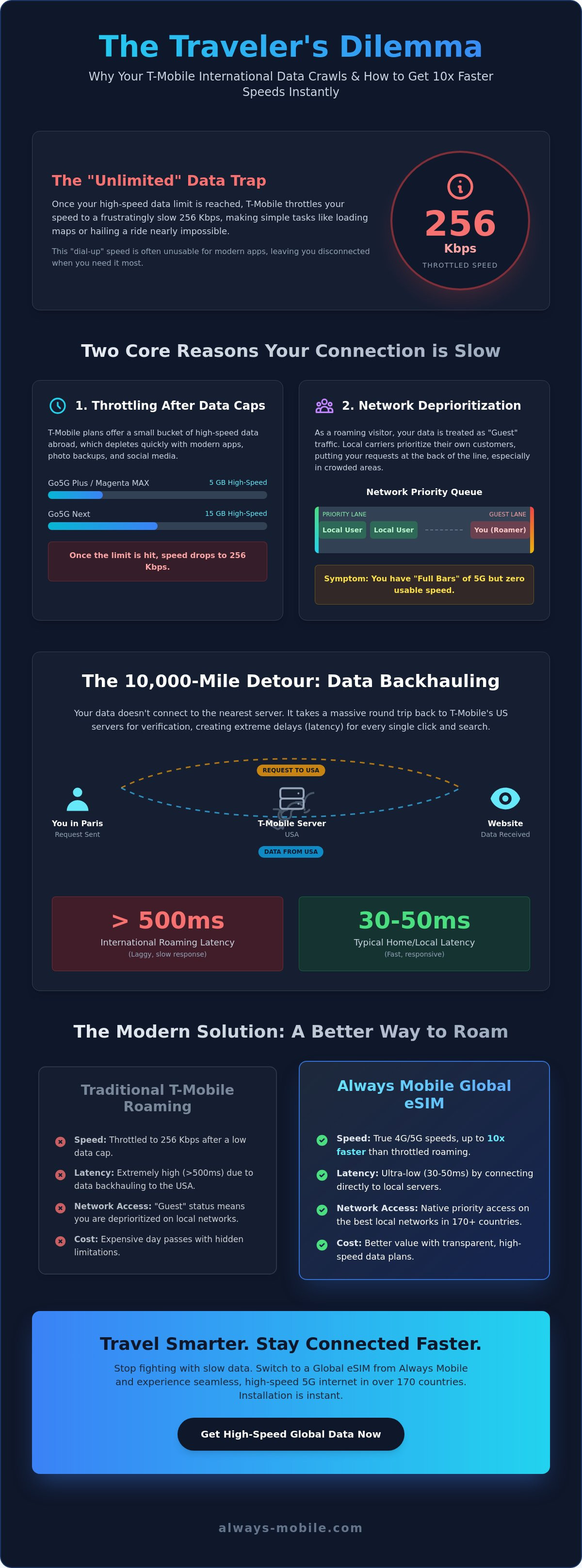
T-Mobile's 2026 plan lineup looks generous on paper, but the fine print matters. If you are on a Go5G Plus or Magenta MAX plan, you only get 5GB of high-speed international data. Those on Go5G Next receive 15GB. While 5GB sounds like a lot, it disappears faster than most travelers expect. Modern smartphones consume data in the background through cloud photo backups, app updates, and high-resolution social media feeds. Once you hit that limit, your speed drops to a maximum of 256kbps. This 256kbps trap is marketed as "unlimited," but it functions more like a dial-up connection. It is often too slow to load a basic navigation route or a simple restaurant menu.
Network Deprioritization in Foreign Lands
You might see "Full Bars" of 5G on your screen and still experience zero usable speed. This occurs because of deprioritization. Local carriers in Europe, Asia, or South America always prioritize their own direct subscribers over roaming visitors. Deprioritization is essentially the guest lane of mobile networks. When the local tower is busy, your data requests are put at the back of the line. Even if the network is technically capable of 5G speeds, your T-Mobile connection is restricted to whatever leftover bandwidth remains after the local customers have had their fill. This is why t-mobile international plan slow speeds are so common in crowded tourist areas or busy city centers.
The Technical Truth: Latency and International Routing
You might have a strong 5G signal icon on your phone while standing in Tokyo, yet your browser still refuses to load. This paradox is often the primary reason for t-mobile international plan slow speeds. The issue isn't always the local tower's signal strength. Instead, it is a technical process called backhauling. When you use data on a T-Mobile roaming plan, your requests don't go straight to the local website or app server. They take a massive detour back to the United States first.
This routing happens because T-Mobile needs to verify your identity, check your data balance, and apply security filters in real-time. Your data essentially acts like a traveler who has to return home for a passport check before every single action. This 10,000-mile round trip happens in the background for every click, scroll, and message. While fiber optic cables are fast, they cannot beat the laws of physics. The sheer distance creates a massive delay that makes even a theoretically fast connection feel like a relic of the 1990s.
Why Your Data Travels Back to the US
Every time you request a webpage, the signal travels from the local foreign tower to an international gateway. From there, it tunnels through undersea cables to a T-Mobile server in the USA. Once the server approves the request, the data travels all the way back to your location. This complex path is why t-mobile international plan slow speeds persist even when you pay for high-speed passes. You are fighting against a digital bottleneck that spans entire oceans. Traditional carriers prioritize this centralized control over your immediate connection speed.
High Latency vs. Low Bandwidth
It is vital to understand the impact of network latency on your mobile experience. Latency is the delay before a data transfer begins. While bandwidth determines how much data can move, latency determines how quickly it starts moving. International roaming latency often exceeds 500ms, which is significantly higher than the 30-50ms you experience at home. This high ping is why WhatsApp calls drop and Google Maps feels jittery. The connection is "laggy" because the delay is too long for real-time communication.
You can bypass this entire technical mess by using a local connection. Switching to a local eSIM plan allows your device to connect directly to local servers, cutting the digital travel distance by thousands of miles. This direct access removes the US-based detour and provides the low-latency experience you actually need while traveling.
T-Mobile International Pass vs. Local eSIM Comparison
Choosing between a T-Mobile International Pass and a local eSIM determines whether you enjoy your trip or spend it hunting for Wi-Fi. T-Mobile's passes are designed for convenience, but they often fail to solve the underlying issue of t-mobile international plan slow speeds. While these passes provide a temporary "high-speed" bucket, they don't change your status on the local network. You remain a roaming guest. In contrast, a local eSIM allows your device to behave like a native subscriber, granting you higher priority on the nearest tower.
Activation methods also differ significantly. T-Mobile usually requires navigating through SMS prompts or a clunky account portal. It's a reactive process. You wait until your data dies, then you buy more. Always Mobile uses a streamlined, app-based approach. You can browse, buy, and activate your plan before you even leave your house. For heavy data users, Always Mobile also offers Daily Unlimited eSIM Plans. These provide a level of freedom that capped carrier passes simply cannot match.
Cost Per Gigabyte Analysis
The 2026 T-Mobile pricing structure offers three main tiers: a 1-day pass for $10, a 10-day pass for $35, and a 30-day pass for $50. These costs add up quickly, especially since they operate on a "use it or lose it" basis. If your 10-day pass expires, your remaining data vanishes. Choosing local esim plans typically provides a much higher data-to-dollar ratio. You pay for exactly what you need without the steep "convenience tax" traditional carriers charge for roaming access.
Speed and Network Quality
Network quality is where the gap widens. Roaming 5G is often restricted by the agreements between T-Mobile and local providers. You might see the 5G icon, but the throughput is throttled. Always Mobile connects you directly to local tier-1 providers. This bypasses the guest-tier restrictions. By using a local eSIM plan , you also avoid the backhauling issues discussed earlier. Your data stays local, meaning your ping stays low and your apps stay responsive. You get the speed you actually paid for, rather than a throttled version of it.
5 Ways to Instantly Fix Slow International Data
Don't settle for a frozen screen while trying to navigate a new city. If you are currently struggling with t-mobile international plan slow speeds, you can take immediate steps to improve your connection. These technical adjustments help you bypass common bottlenecks and make the most of the limited bandwidth available through traditional roaming. Start by enabling "Low Data Mode" on your iPhone or "Data Saver" on your Android device. This simple toggle stops background apps from consuming your 5GB high-speed bucket, ensuring your data is reserved for essential tasks like maps and messaging.
Manual Network Selection
Your phone is programmed to select a roaming partner automatically. Often, it picks the carrier with the strongest signal rather than the one with the fastest data throughput. You can override this. Open your settings, navigate to Cellular or Mobile Data, and find the "Network Selection" menu. Turn off the "Automatic" toggle. Your phone will scan for all available local networks. Test different partners; for example, switching from Vodafone to Orange or T-Mobile's local affiliate might significantly reduce latency. Some local partners have better peering agreements with T-Mobile, which can lead to a more responsive experience.
Another quick fix involves managing your app permissions. Disable background app refresh for social media and video platforms. These apps often attempt to sync high-resolution content in the background, which consumes your priority data and contributes to t-mobile international plan slow speeds. By restricting these processes, you free up the "pipes" for the apps you are actively using.
The "Dual SIM" Strategy
The most effective way to reclaim speed is to separate your data from your primary phone line. You can keep your T-Mobile SIM active to receive important texts and calls from home while using a dedicated travel eSIM for all data-heavy tasks. This allows you to leverage local network priority. Once you purchase a plan, you must set Always Mobile as the "Primary" data source in your cellular settings. This ensures your phone never attempts to use the throttled T-Mobile roaming data for web browsing or app usage.
Implementing this strategy takes less than five minutes. Follow our detailed guide on how to install and activate your travel eSIM to get started. By using two lines simultaneously, you maintain your US identity without sacrificing the speed needed for a modern travel experience.
Ready to leave the guest lane behind? Get instant access to local 5G networks with a Global eSIM plan and enjoy the performance your trip deserves.
Switch to Always Mobile for True 5G Speed Abroad
You shouldn't have to settle for a second-class digital experience while exploring the world. Traditional carriers often treat international data as an afterthought, leading to the t-mobile international plan slow speeds that disrupt your travel plans. Always Mobile offers a no-nonsense alternative designed specifically for the modern traveler. By focusing exclusively on high-speed data, we eliminate the technical baggage of legacy voice and SMS systems. You get pure, unthrottled performance without the "guest lane" restrictions of traditional roaming.
Choosing a digital-first provider means you are no longer at the mercy of complex peering agreements or trans-oceanic backhauling. Our infrastructure connects you directly to local tier-1 networks. This ensures that your ping stays low and your bandwidth stays high. Whether you need to hop on a sudden video call or upload high-resolution memories, your connection remains stable and responsive. We value your time and prioritize your utility above all else. It is a smarter, more agile way to stay connected.
Instant Connectivity Upon Arrival
Forget the stress of hunting for an airport kiosk or fumbling with paperclips to swap physical SIM cards. Always Mobile allows you to activate your plan the moment your plane touches down. You can browse, buy, and install your eSIM before you even leave home. When you land in one of over 170 supported countries, your phone connects to the local 4G or 5G network immediately. This seamless transition provides instant relief, allowing you to book a ride or check into your hotel without a single second of lag. It's a professional, stress-free way to navigate your destination.
Flexible Plans for Every Traveler
Every trip has different data demands. If you are heading to a single destination, you can grab a country-specific plan like an esim spain or an esim thailand. These plans provide local-tier priority at a fraction of the cost of carrier passes. For those crossing multiple borders, our regional esim plans offer a single, unified solution for entire continents. You won't have to worry about t-mobile international plan slow speeds every time you cross a new frontier.
If you are a power user, our Daily Unlimited eSIM Plans provide the ultimate freedom. No caps. No throttling. Just consistent, high-speed access throughout your stay. Reclaim your digital independence and focus on the journey ahead rather than your data balance. Get your Always Mobile eSIM today and stop roaming.
Reclaim Your Global Connection
You don't have to accept t-mobile international plan slow speeds as an inevitable part of your trip. The technical bottlenecks of backhauling and deprioritized "guest" access are optional, not mandatory. By choosing a direct local data path, you cut the latency that causes maps to lag and video calls to drop. You deserve a connection that works the moment you land, without the frustration of capped data buckets or the 256kbps throttle. Modern travel demands modern tools that prioritize your time and utility.
Take control of your connectivity before your next flight. Experience instant activation in over 170 countries and gain direct access to local 5G networks with zero hidden roaming fees. It is the smarter, more agile alternative to traditional carrier systems. Stop fumbling with clunky account portals and start enjoying the performance your device was built for. Your journey is about exploration, not waiting for a browser to load. Make the switch to a reliable, tech-savvy travel companion and travel with total confidence.
Stop Roaming and Start Surfing: Get Your Always Mobile eSIM Now
Frequently Asked Questions
Why is my T-Mobile international data so slow?
Your data is slow because of backhauling and network deprioritization. T-Mobile routes your data requests through servers in the United States before sending them back to your foreign location, which creates massive latency. Additionally, local carriers prioritize their own direct subscribers over roaming guests. These technical hurdles result in t-mobile international plan slow speeds even when your phone shows a strong 5G signal icon.
Does T-Mobile throttle international data after 5GB?
Yes, T-Mobile throttles data once you exceed your plan's specific high-speed allotment. For Go5G Plus and Magenta MAX customers, this cap is 5GB of high-speed data. Go5G Next users receive 15GB. After hitting these limits, your speed is reduced to a maximum of 256kbps. This speed is barely functional for modern apps and will make navigation or media streaming nearly impossible during your trip.
Can I use an eSIM with my T-Mobile plan?
You can definitely use an eSIM alongside your existing T-Mobile plan. Most modern smartphones feature Dual SIM technology, allowing you to run two lines simultaneously. You keep your physical T-Mobile SIM or primary eSIM active for calls and texts while adding a second data-only eSIM for high-speed internet. This is the most efficient way to bypass roaming bottlenecks without disconnecting from your primary US number.
Is a T-Mobile International Pass worth it?
A T-Mobile International Pass offers convenience but often lacks value for heavy users. While it provides a temporary high-speed bucket, the data is still routed through the US, meaning latency issues persist. At $50 for 15GB, it is significantly more expensive than local data options. If you need responsive 5G speeds for maps and video calls, a dedicated travel eSIM typically provides better performance for a lower cost.
How do I turn off data roaming on T-Mobile?
Turn off data roaming by navigating to your phone's settings menu. On an iPhone, go to Settings, then Cellular, then Cellular Data Options, and toggle the Data Roaming switch to off. On Android, go to Settings, then Connections, then Mobile Networks. Disabling this feature prevents your phone from using T-Mobile's international data, which is useful when you want to rely entirely on a secondary high-speed eSIM.
What is the best eSIM for international travel with T-Mobile?
Always Mobile is the most effective choice for travelers looking to avoid t-mobile international plan slow speeds. It provides direct access to local tier-1 networks in over 170 countries, bypassing the US-routing detour that slows down traditional roaming. With options for local, regional, and global plans, you get native 5G speeds and lower latency. It functions as a high-performance data partner to your existing T-Mobile service.
Will my T-Mobile number work if I use a travel eSIM?
Your T-Mobile number remains fully functional while using a travel eSIM. By utilizing Dual SIM settings, you can set T-Mobile as your primary line for voice and SMS while designating the travel eSIM as your primary source for cellular data. This configuration ensures you still receive important calls and iMessages from home without being forced to use T-Mobile's throttled and high-latency international data roaming.
How do I check my T-Mobile international data usage?
Check your usage instantly by dialing #932# (#WEB#) from your phone's keypad. You will receive a text message detailing your total data consumption and your remaining high-speed balance. You can also monitor your usage through the T-Life app or by logging into your account on the T-Mobile website. Tracking this daily helps you stay ahead of the automatic speed reduction that occurs once your high-speed bucket is empty.