

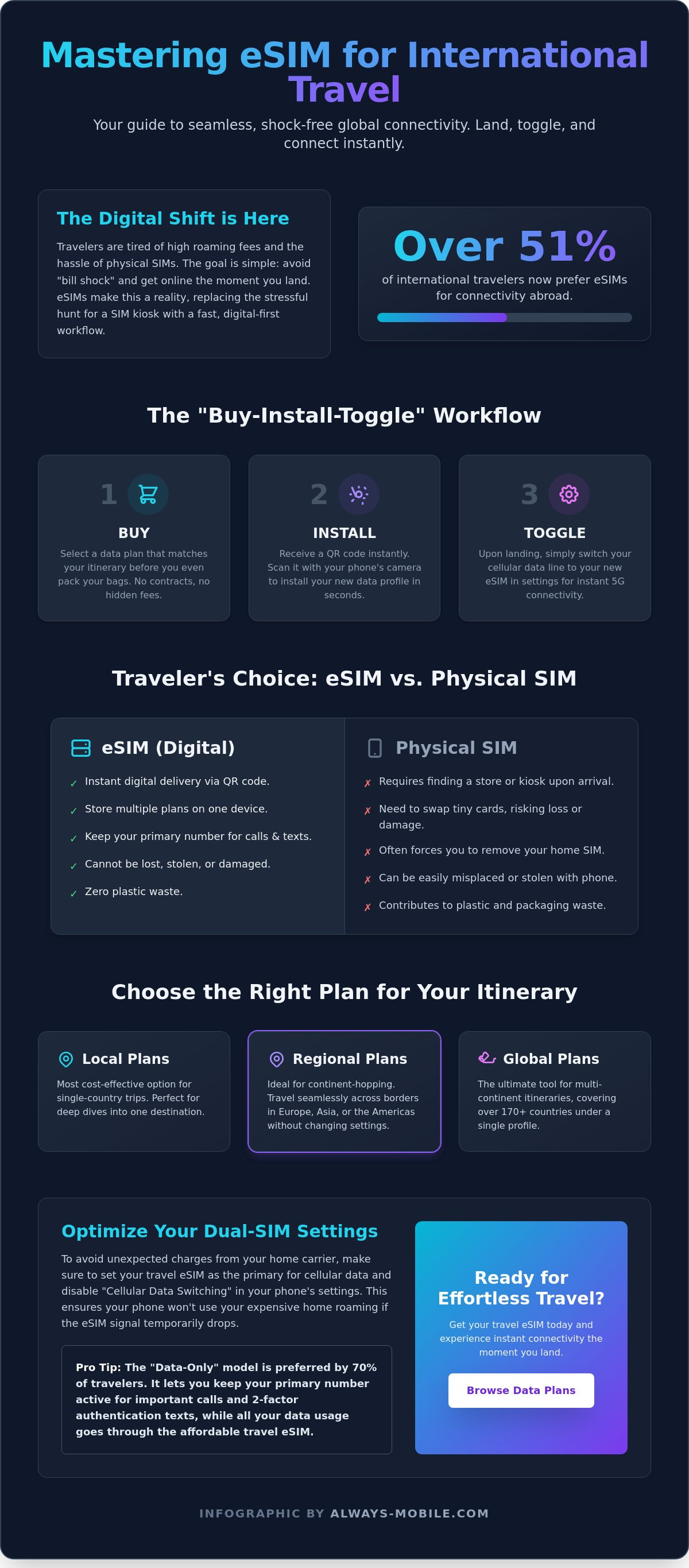
Over 51% of travelers now choose digital SIMs as their primary way to stay connected across borders. It's a massive shift driven by one goal: avoiding the "bill shock" that comes with traditional carrier roaming. You likely want to land, toggle a switch, and immediately access local maps or ride-sharing apps. Mastering how to use esim for international travel makes this possible. It replaces the stressful hunt for physical SIM kiosks with a fast, digital-first workflow.
You shouldn't have to choose between keeping your primary number and enjoying affordable data. We agree that international connectivity must be effortless. This guide provides a clear roadmap to master your digital roaming setup. You'll learn how to install, activate, and optimize your travel eSIM for seamless global coverage. We'll walk through the "Buy-Install-Toggle" strategy to ensure you have instant 5G data the moment you touch down.
Key Takeaways
- Understand how embedded SIM technology eliminates the need for physical hardware swaps while keeping your primary number active for essential texts.
- Select the most cost-effective data plan by matching your itinerary to local, regional, or global coverage options.
- Master how to use esim for international travel with a simple "Buy-Install-Toggle" workflow that ensures instant 5G connectivity upon arrival.
- Optimize your dual-SIM settings to prevent background data drain and avoid unexpected charges from your home carrier.
- Access reliable high-speed networks in over 170 countries with streamlined digital activation and no long-term contracts.
Table of Contents
Understanding eSIM Technology for Global Travel
An eSIM is a programmable chip embedded directly into your smartphone's hardware. Unlike traditional cards, it is a permanent fixture on the motherboard. You don't need to fumble with trays, paperclips, or tiny pieces of plastic. This hardware allows you to download cellular profiles digitally. It is the foundation of Understanding eSIM Technology for the modern age. You can store multiple profiles on a single device and switch between them with a few taps. It makes staying connected feel like a software update rather than a hardware chore.
The "Data-Only" model offers a strategic advantage for most travelers. You likely don't need a local phone number to order a taxi or check a map. By using a data-only plan, you keep your primary home number active for iMessage, WhatsApp, and other messaging apps. This setup eliminates the risk of "bill shock" from your home carrier while ensuring you remain reachable. It is a cleaner, more focused way to manage your digital footprint abroad.
Security is another major benefit. Digital SIMs cannot be physically stolen or lost. If your phone is misplaced, a thief cannot simply pop out the SIM to disable tracking or hijack your data. The profile is locked to your hardware. There is also an environmental win. Shifting to digital profiles eliminates the production and packaging waste associated with millions of plastic SIM cards every year. It is a sustainable choice for the eco-conscious explorer.
What is an eSIM and How Does it Work?
An eSIM is a remote-provisioned telecommunications profile that eliminates the need for physical media. Learning what is an esim card reveals how it allows for instant carrier switching without visiting a retail store. It works alongside your existing physical SIM rather than replacing it. This dual-SIM capability is the secret to how to use esim for international travel effectively. You maintain your primary line for essential calls while the eSIM handles high-speed local data.
eSIM vs. Physical SIM: The Traveler’s Choice
Traditional SIM swapping is a logistical headache. It requires finding a kiosk, handling fragile hardware, and risking the loss of your home SIM card. The eSIM replaces this friction with a simple QR code scan. Comparing esim vs physical sim highlights a clear shift toward efficiency. By 2026, most flagship smartphones have moved toward eSIM-only designs. This trend makes digital roaming the global standard. You land; your phone connects; you move on. There are no lines and no waiting.
Selecting the Right eSIM Data Plan for Your Itinerary
Choosing a data plan requires a realistic look at your digital habits. Don't guess. A traveler using maps and social media occasionally needs far less data than a remote worker on video calls. Many travelers default to "International Day Passes" from home carriers. These often cost five times more than a dedicated travel eSIM. For better value and security, follow the official FCC guidance on eSIMs which highlights the convenience of digital switching. Learning how to use esim for international travel starts with matching your plan to your destination list.
Local vs. Regional vs. Global Plans
Coverage areas fall into three main categories. Select the one that fits your route to avoid paying for data you can't use. 70% of travelers prefer data-only plans for their simplicity and cost-effectiveness.
-
Local Plans: These are the most cost-effective for single-country trips. If you're spending a week in Madrid, an esim spain provides the best local rates.
-
Regional Plans: Ideal for cross-border travel within a continent. They allow you to cross from esim thailand into neighboring countries without changing settings.
-
Global Plans: A global esim is the ultimate tool for multi-continent itineraries. It covers dozens of countries under one profile.
Unlimited Daily Data vs. Fixed Packages
Data volume is the next decision. Fixed packages, like 10GB for 30 days, work well for light users. However, heavy users often prefer Daily Unlimited eSIM Plans. These provide a fresh bucket of data every 24 hours. Check the "fair usage policy" for these plans; some may throttle speeds after a certain threshold. If you need to connect a laptop, ensure your plan supports tethering or personal hotspots. You can browse available regional plans to find the exact data limit that fits your budget.
Think about your trip duration. A 1GB daily plan is often superior to a bulk 10GB monthly plan if you have a short, high-intensity trip. It prevents you from running out of data mid-journey. Always prioritize reliability over the absolute lowest price. A cheap plan that fails in a remote area isn't a bargain. Focus on providers that partner with tier-one local networks for the most consistent 5G experience. This ensures you have the bandwidth for navigation and communication the moment you land.
Step-by-Step Guide: Installing and Activating Your Travel eSIM
Installing your data plan is a digital process that requires no physical tools. You don't need a paperclip or a steady hand. Success depends on timing and a stable internet connection. Most travelers fail because they wait until they land to begin the setup. Follow this "Buy-Install-Toggle" workflow to ensure you have 5G data the second the plane wheels touch the tarmac. This is the most reliable way to master how to use esim for international travel without stress.
Pre-Travel Checklist: Compatibility and Network Unlocks
Your phone must be carrier-unlocked to accept a third-party eSIM. Check this before you buy. On an iPhone, navigate to Settings > General > About and look for "No SIM restrictions" under the Carrier Lock section. For Android users, this information is usually under Settings > Connections > Mobile Networks. As of 2026, over 2 billion devices are eSIM-enabled, including every iPhone since the XS and Samsung Galaxy models from the S20 onwards. Review Apple's guide to travel eSIMs for specific hardware requirements or check our Device Compatibility list . Download your profile at least 24 hours before your flight to avoid last-minute connection issues at the gate.
Installation via QR Code or Manual Entry
Once you purchase your plan, you'll receive a QR code via email. Open this on a separate screen or print it out. The installation steps are straightforward but vary slightly by device.
-
For iOS: Go to Settings > Cellular > Add eSIM. Use your camera to scan the QR code.
-
For Android: Go to Settings > Network & Internet > SIMs > Add. Select "Download a SIM instead" and scan the code.
-
Manual Entry: If your camera won't scan, select "Enter Details Manually." You'll need to copy the SM-DP+ Address and Activation Code from your confirmation email.
Label your new plan immediately. Use a clear name like "Travel Data" or "Spain 2026." This prevents you from accidentally using your home carrier's expensive roaming data later.
Activation Upon Landing
Keep your eSIM line turned off until you land at your destination. Once the plane arrives, toggle the "Travel Data" line to On. You must also enable "Data Roaming" for this specific line. Do not enable roaming for your primary home SIM. It often takes 2-5 minutes for the device to register on a local 5G network for the first time. Be patient. If you don't see a signal bar after five minutes, restart your phone. This simple reset forces the hardware to handshake with the local tower, completing the process of how to use esim for international travel effectively.
Maximizing Your eSIM: Settings, Data Management, and Tips
Your eSIM is installed and active. Now you must optimize your device to prevent background data leaks and accidental roaming fees. The secret to how to use esim for international travel like a pro lies in your settings menu. Most travelers land and forget to toggle off the features that drain data. A few intentional clicks will preserve your data bucket and keep your primary number reachable for essential alerts.
Configuring Dual-SIM Mode
Modern smartphones allow you to run two lines simultaneously. Keep your home SIM active to receive two-factor authentication codes and iMessages. However, you must designate the eSIM as the sole provider for cellular data. Go to your cellular settings and select your travel line for data. This setup ensures you don't miss important texts while the eSIM handles the heavy lifting of navigation and browsing. Check with your home mobile company to ensure you understand their policies for voice call and sms delivery when you are abroad.
Turn off "Allow Cellular Data Switching" immediately. This is the most common cause of unexpected carrier charges. If this feature is active, your phone will automatically switch back to your home SIM if the travel network fluctuates. Ensure your home line is labeled "Primary" and your travel line is "Secondary" to avoid confusion. This clear separation is the best way to maintain how to use esim for international travel without financial surprises.
Preventing Background Data Leaks
Apps often consume data even when you aren't using them. Background processes can drain a 1GB plan in hours if left unchecked. Take control of your usage with these steps:
-
Disable Background App Refresh: Restrict this to essential apps like Maps or Translate.
-
Turn off Wi-Fi Assist (iOS): This prevents your phone from using cellular data to "help" a weak Wi-Fi signal.
-
Disable Auto-Updates: Ensure the App Store only updates over Wi-Fi to save your travel data for the road.
Android users should set a data limit and warning in the "Mobile Data" settings. This provides a hard stop before you hit your plan's ceiling. If you find your usage is higher than expected, you can purchase a daily unlimited eSIM plan to remove the stress of monitoring every megabyte. Use offline maps for navigation. Download your city maps while on hotel Wi-Fi to save data for social media and communication. Monitoring your usage through the provider's dashboard allows you to stay ahead of your needs and avoid being disconnected at a critical moment.
Why Always Mobile is the Essential Travel Companion in 2026
Selecting your provider is the final strategic decision in your connectivity plan. Always Mobile simplifies how to use esim for international travel by removing the friction of traditional contracts and physical hardware. It isn't just about basic access; it's about consistent, high-speed performance wherever your itinerary leads. We provide a solution-oriented platform designed to address the core anxieties of the modern explorer. You land, you connect, and you move forward without a second thought.
Instant 5G Connectivity in 170+ Countries
Coverage and speed are the two pillars of a successful trip. Always Mobile offers instant activation in over 170 countries, ensuring you never have to hunt for a precarious Wi-Fi signal at a crowded airport. Our local esim plans connect you directly to top-tier 4G and 5G local networks. This ensures the lowest possible latency for maps, ride-sharing, and translation apps. If your trip extends, use the "one-click" top-up feature in your dashboard to add more data in seconds. You also have access to 24/7 digital support to resolve any setup questions in any time zone. This level of immediacy is the new global standard for digital connectivity.
No Hidden Fees or Roaming Surprises
Traditional roaming is synonymous with "bill shock." Always Mobile eliminates this anxiety with a strictly prepaid model. You can never spend more than you intend. There are no surprise overage charges, administrative fees, or hidden taxes. You choose your plan, pay once, and enjoy your journey. We offer a range of flexible options to suit every type of traveler. This transparent approach provides immediate relief from the complexities of modern mobile billing. You keep your primary number for essential calls while we handle the high-speed data. It's time to leave the hardware swaps and expensive carrier passes in the past. Get your international travel eSIM from Always Mobile today and experience the freedom of digital-first connectivity.
Our flexible plans are built for the way people actually move in 2026. Whether you need a short-term local fix or a robust regional solution, the workflow remains the same. We prioritize your time and your budget by delivering a no-nonsense service that just works. Focus on your destination, not your data limits. With a secure, encrypted digital profile, you can explore with the confidence that your connection is as mobile as you are.
Master Your Global Connectivity Today
Transitioning to digital roaming is the most efficient way to travel in 2026. You've learned how to bypass physical SIM kiosks and avoid expensive carrier roaming fees. By mastering how to use esim for international travel, you maintain full control over your data usage while keeping your primary number active for essential security alerts. It's a strategic move that combines cost savings with immediate 5G access upon landing.
Stop hunting for paperclips and airport kiosks. You can secure instant connectivity in over 170 countries with a few taps. Our prepaid plans start under $5 and require no physical SIM swapping. This ensures a seamless transition from the airplane to your first destination. Browse Always Mobile eSIM Plans for Your Next Trip and take the stress out of your international itinerary.
Your next journey deserves reliable data without the hidden costs. Trust the digital workflow to keep you connected and focused on the adventure ahead. Safe travels.
Frequently Asked Questions
Will I lose my WhatsApp number if I use a travel eSIM?
No, your WhatsApp account remains tied to your primary phone number. You can continue using all your existing chats and contacts without any interruption. The app simply uses the eSIM data connection to send and receive messages. Just ensure you don't select the option to change your number within the WhatsApp settings menu during your trip.
Can I use my eSIM for phone calls and SMS?
Most travel eSIMs are data-only and don't include a traditional phone number. You won't be able to make standard carrier calls or send SMS through the eSIM line. Instead, use data-driven apps like WhatsApp, FaceTime, or Zoom to communicate. This approach avoids high roaming fees while keeping you connected to everyone in your contact list through your existing apps.
What happens if I run out of data while I am abroad?
Your data connection will simply stop when you hit your plan limit. There are no hidden overage charges or automatic billing cycles to worry about. You can instantly purchase a top-up through your provider's mobile app or website to restore your connection for most eSIM plans. This transparent system ensures you only pay for the data you actually need during your journey.
How do I know if my phone is compatible with eSIM technology?
Check your phone's settings to confirm compatibility. On an iPhone, go to Settings > Cellular and look for "Add eSIM." Android users can find this under "SIM Manager" or "Network & Internet." Remember that your device must also be carrier-unlocked. If your phone is still under a payment plan, contact your carrier to request an unlock before you depart. Or you can check our Device Compatibility listing for Android and iPhone.
Can I use one eSIM in multiple countries?
Yes, as long as you choose a Regional or Global plan. These specific packages cover multiple countries under a single digital profile. If you're backpacking through Europe or Asia, a regional plan allows you to cross borders without changing any settings. It's a seamless solution for multi-destination itineraries that saves you the trouble of buying separate plans for every stop.
Is it better to buy an eSIM before I travel or when I arrive?
Buy and install your eSIM at least 24 hours before you depart. You need a stable Wi-Fi connection to download the digital profile correctly. Once it is installed, keep the line turned off until you land at your destination. This preparation ensures you have 5G data the second you step off the plane, avoiding the hunt for airport Wi-Fi.
What is the difference between an eSIM and an international data plan?
An eSIM is the digital technology that replaces a physical plastic card. An international data plan is the specific service package you buy for that technology. Traditional carrier plans are often expensive and tied to your home contract. Travel eSIM plans are prepaid and offer local rates, making them a smarter choice for how to use esim for international travel in 2026.