

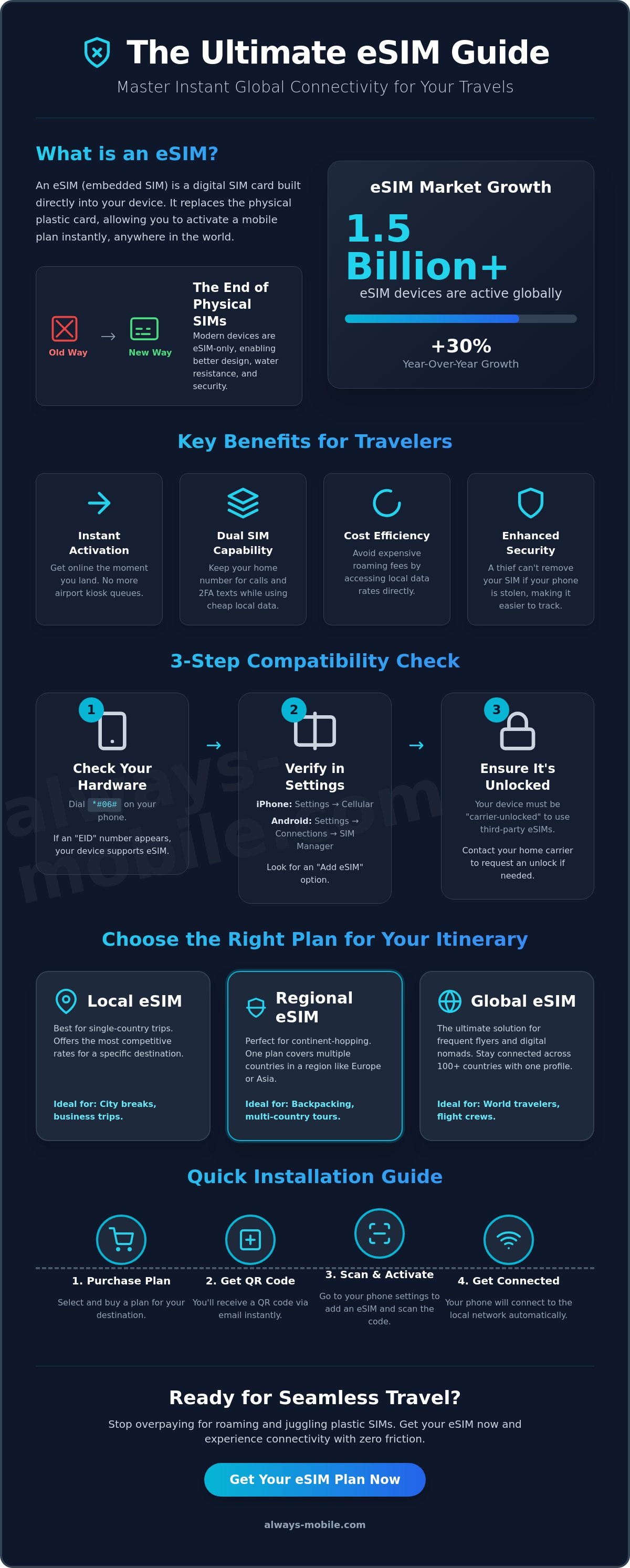
Over 1.5 billion devices will rely on esims this year. That is a 30% jump since 2025 according to data from Juniper Research. You likely recognize the dread of landing in a new country and bracing for a massive roaming bill. Juggling physical SIM cards is frustrating. Losing access to WhatsApp or iMessage creates unnecessary anxiety. You need a connectivity solution that works immediately.
This guide shows you how to master esims to get instant 4G/5G data the moment you touch down. You'll learn how to keep your original number active for 2FA texts while slashing your travel costs. We'll cover everything from checking your device compatibility via the *#06# shortcut to selecting the perfect local, regional, or global plan. Stop overpaying for basic connectivity. Use this guide to manage your esims and stay connected anywhere on earth with zero friction and total confidence.
Key Takeaways
- Understand how embedded chips became the primary global connectivity standard for 2026.
- Verify your device compatibility and carrier-unlocked status before you purchase a plan.
- Choose between local, regional, and global esims to find the most efficient data solution for your itinerary.
- Master the QR code installation process to get online the moment you touch down.
- Learn to store and switch between multiple digital profiles for seamless travel across borders.
Table of Contents
What are eSIMs and Why are They Standard in 2026?
An eSIM is an embedded, programmable chip built directly into your device's hardware. Unlike traditional plastic cards, you cannot remove it. It is a digital-first solution that allows you to download and activate mobile plans over the air. By 2026, this technology has moved from a niche feature to the global standard for mobile connectivity. For a deep dive into the technical standards and history, you can explore What is an eSIM? to see how this hardware evolved.
The industry shift is now complete. In 2026, the number of devices using esims has reached 1.5 billion globally. This 30% increase from last year is driven by major manufacturers like Apple, Samsung, and Google. Most flagship smartphones are now eSIM-only. This transition eliminates the need for physical SIM swapping and provides a more seamless user experience. You no longer need to carry a SIM tool or worry about losing a tiny piece of plastic while traveling between countries.
The Death of the Physical SIM Card
Manufacturers have largely abandoned the SIM tray. Removing this mechanical component allows for larger batteries and superior waterproofing. It also enhances your digital security. If your device is lost or stolen, a thief cannot simply remove the SIM card to take the phone offline. The digital profile remains locked to the hardware, making tracking more effective. This hardware evolution is a primary reason why esims are now mandatory for modern travelers. You can compare the technical differences in our guide on esim vs physical sim for a complete breakdown.
Key Benefits for the 2026 Traveler
The 2026 travel experience is defined by immediacy and cost control. Digital plans remove the friction of traditional roaming. You gain several practical advantages when you switch to digital profiles:
-
Instant Activation: Download your plan and get connected before the plane even reaches the gate.
-
Cost Efficiency: Access local data rates directly. Avoid the high daily roaming fees charged by home carriers.
-
Dual-SIM Capability: Modern devices allow you to run multiple lines simultaneously. Use a travel plan for 5G data while keeping your original number active for important 2FA texts and iMessage.
-
Environmental Impact: Switching to digital profiles significantly reduces plastic waste and the carbon footprint associated with shipping physical cards.
This digital-first approach ensures you stay connected anywhere on earth without the typical stresses of old-school mobile networking. It is the smarter, more agile way to manage your global footprint.
Checking Device Compatibility and Network Support
Hardware compatibility is the first hurdle in your digital transition. While most 2026 flagship devices are eSIM-only, many older models still rely on traditional physical slots. You must verify that your phone contains the necessary embedded chip before purchasing a plan. The fastest way to confirm this is by dialing *#06# on your device's keypad. If an "EID" (eSIM Identifier) number appears on your screen, your hardware supports esims. This number is the digital fingerprint used to provision your network profile remotely. You can also check your phone on our Device Compatibility list .
Network support also depends on your device's 5G capabilities. In 2026, high-speed 5G is the baseline for international travel. Most modern travel plans prioritize these networks to ensure you have enough bandwidth for maps, translation apps, and video calls. For a deeper look at how these standards benefit you, the FCC consumer guide to eSIMs provides excellent context on security and accessibility for wireless users. Once you've confirmed your hardware is ready, you can select a local data plan tailored to your destination.
How to Check Your iPhone or Android
Verifying compatibility takes less than a minute in your settings menu. For iPhone users, navigate to Settings > Cellular and look for the "Add eSIM" option. If you see this, your device is ready. Android users should go to Settings > Connections > SIM Manager. If the "Add eSIM" button is visible, your phone supports digital profiles. For a comprehensive list of supported hardware from Apple, Samsung, and Google, check our esim compatible phones checklist.
Carrier Locking: The Hidden Barrier
A compatible phone won't work if it's locked to your home carrier. This is a common issue for devices currently on a monthly payment plan. Carriers often restrict hardware to their own network until the device is fully paid off. A locked phone will reject any esims from a third-party provider. You must contact your home carrier to request a "network unlock" before your trip. Most providers will process this request within 48 hours if your account is in good standing. This step is essential because hardware compatibility means nothing if the software doesn't have the authorization to switch networks. Secure your unlock early to avoid connectivity issues at the airport.
Choosing the Right eSIM Plan for Your Itinerary
Select your plan based on your movement. Efficiency defines modern travel. You have three primary choices for esims: local, regional, and global. Match your selection to your specific itinerary to maximize value and avoid paying for coverage you don't need. The underlying eSIM technical standards allow these profiles to authenticate on diverse networks without hardware changes. This flexibility is why digital-first plans have become the standard for 2026 travelers.
Local plans serve single-country trips. These are ideal for stays between 7 and 30 days. You get the highest speeds and lowest rates by connecting directly to a domestic carrier. Regional plans simplify multi-stop journeys. If you are backpacking through Europe or Southeast Asia, one regional profile covers every border. You won't need to install a new profile every time you cross a frontier. This saves time and ensures continuous GPS access. Global plans cater to digital nomads. These profiles work across multiple continents, ensuring you never lose a connection during long-haul transitions between disparate regions.
Data-Only vs. Voice/SMS Plans
Most travelers don't need a traditional phone number. Data-only plans are significantly cheaper and more efficient. Use apps like WhatsApp, FaceTime, or Skype to handle your calls and messages. This approach keeps your costs low while providing high-speed internet. It also prevents your home carrier from triggering expensive "International Day Pass" charges. In fact, local esim plans are the most cost-effective for 90% of travelers today. They provide the necessary bandwidth for communication apps without the bloat of traditional voice services. Your primary number stays active for 2FA, but the digital plan handles the heavy lifting.
Calculating Your Data Needs
Choose your data volume carefully to avoid mid-trip interruptions. A 1GB plan works for light navigation and occasional emails over a week. Opt for 10GB or higher if you rely on social media or video streaming. High-definition video, social scrolling, and active GPS are major data hogs. If you choose a Daily Unlimited plan, watch for Fair Usage Policies (FUP). Some carriers reduce your speed after you hit a specific daily threshold. This is a common practice even for the most modern esims. Evaluate your habits before you buy. This ensures you have enough data for the entire trip without paying for unused bandwidth. Always check if your destination has widespread public Wi-Fi to supplement your mobile data usage during your stay.
Step-by-Step: How to Install and Activate an eSIM
Installation is the bridge between purchasing a plan and browsing the web. Most esims follow a standardized digital workflow that takes less than two minutes. You must have a stable Wi-Fi connection to download the profile to your device's embedded chip. Complete this process at home or in your hotel before you head to the airport. It removes the stress of hunting for public Wi-Fi in a busy terminal. Once the profile is on your device, it remains dormant until you choose to trigger it.
While the QR code is the most common method, premium providers now offer direct app installation. This is the most seamless experience available in 2026. You simply tap a button in the provider's app, and the profile installs itself in the background. If your camera cannot scan a code, you can always fall back on manual installation. This involves copy-pasting an SM-DP+ Address and an Activation Code into your cellular settings. Both methods achieve the same result: a ready-to-use digital line. To ensure you're ready for your next journey, get your regional eSIM plan today and follow these steps for a friction-free setup.
The Installation Workflow
-
Step 1: Purchase your plan. You will receive a confirmation email containing your activation credentials or a QR code.
-
Step 2: Open your cellular settings while connected to Wi-Fi. Scan the QR code or select the direct installation option. On an iPhone, go to Settings > Cellular > Add eSIM. On Android, navigate to Settings > Connections > SIM Manager.
-
Step 3: Label the new line immediately. Give it a clear name like "Japan Data" or "Europe 2026." This prevents confusion when you are switching between multiple profiles later in your trip.
The Arrival Activation
Timing is everything. Do not turn on your travel line until you touch down at your destination. This ensures your plan's validity period doesn't start while you are still in the air. Once you land, toggle the eSIM line to "On" in your settings. You must then set this line as your primary "Cellular Data" or "Mobile Data" source. This tells your phone to use the travel plan for all internet traffic while keeping your home line available for voice and SMS.
The most critical step is the data roaming toggle. You must enable "Data Roaming" for the travel eSIM line specifically. Keep it disabled for your primary home line. This allows the travel plan to connect to local networks without triggering expensive roaming fees from your home provider. If you skip this, your data won't work upon arrival. For a deeper dive into these settings, read our guide on how to use esim for international travel. This simple configuration ensures you have instant 5G access the moment the plane reaches the gate.
Troubleshooting and Managing Multiple eSIMs
Modern smartphones are digital libraries for connectivity. Most flagship devices in 2026 can store eight or more esims simultaneously. This capacity allows you to keep your home line, a regional plan, and a local plan for a specific destination all in one place. You can keep these profiles dormant until they are needed. Switching is a simple process. Open your SIM Manager, select the desired profile, and toggle it on. The device will typically register with the new network in under thirty seconds.
Network selection usually happens automatically. However, cross-border transitions can occasionally cause a lag in registration. If your signal bar remains empty after crossing a frontier, navigate to your network settings. Turn off "Automatic" network selection. Wait for the list of local carriers to populate. Select the specific carrier recommended in your activation instructions. This forces the hardware to re-authenticate with the correct local tower. Always ensure your physical SIM is set to "Off" for data. If your home line remains active for data, you risk triggering expensive roaming fees. Keep it active for voice and SMS only.
What to Do if There is No Signal
Signal issues are often resolved with a few quick checks. Start with the "Airplane Mode" reset. Toggle it on for ten seconds and then off again. This forces a fresh search for local towers. If that fails, verify your APN (Access Point Name) settings. Access your cellular data network menu and ensure the APN field matches your provider's instructions exactly. A single typo can prevent a data connection. Finally, confirm your plan's activation date. Some esims are set to trigger on a specific day. If you arrive early, the network will reject the connection until that window opens.
Maximizing Connectivity with Always Mobile
Efficiency is the core of our service. Always Mobile profiles are designed to scan for and select the strongest available local network automatically. You don't need to hunt for towers manually in most cases. If you find yourself running low on data during a long trip, use our digital dashboard. You can top up your existing plan instantly. There is no need to download or install a new profile. This keeps your connectivity seamless and your settings intact. Ready to travel? Browse our global eSIM plans for instant 5G connectivity and stay connected anywhere on earth.
Future-Proof Your Global Travel Experience
Digital connectivity is no longer a luxury. It is a travel essential. You now have the tools to navigate the global shift toward esims with complete confidence. By 2026, the era of hunting for physical SIM cards and paying exorbitant roaming fees has ended. You have learned how to verify your hardware, select the most efficient plan for your itinerary, and manage multiple profiles without losing access to your home number.
The process is simple. Choose your destination. Install your profile. Activate upon arrival. This digital-first approach ensures you remain reachable for 2FA and messaging while enjoying local data speeds. Stop worrying about hidden costs or connectivity gaps. You are now equipped to stay online across every border you cross.
Ready to experience the freedom of modern roaming? Get Connected Instantly with Always Mobile eSIMs. Enjoy coverage in 170+ countries with instant activation on arrival. There is no physical SIM swapping required and no friction involved. Take control of your digital footprint and stay connected anywhere on earth. Your next adventure is just one download away.
Frequently Asked Questions
Can I keep my WhatsApp number if I use an eSIM?
Yes, you can keep your original WhatsApp number without any issues. The app is linked to your account registration, not your data source. Keep your primary line active in your settings to maintain your identity while using esims for international data. This ensures your chats, groups, and contacts remain exactly as they are while you browse on a local data plan.
What happens if I delete my eSIM profile by mistake?
Always Mobile eSIMs can be re-installed on the same device multiple times. So if you accidently delete your eSIM, you can rescan the QR Code to install it in the same device again.
Do eSIMs work on tablets and smartwatches?
Yes, many modern tablets and smartwatches are compatible with this technology. Devices like the iPad Pro and various LTE-enabled smartwatches have embedded chips built into their hardware. You can download a plan directly to these secondary devices to stay connected without relying on a nearby smartphone. Verify that your specific model supports cellular connectivity before you purchase a plan.
Can I use my phone as a hotspot with an eSIM?
Yes, you can typically use your device as a personal hotspot. All our eSIM plans allow tethering, which lets you share your 5G or LTE data with a laptop or another phone. It is an efficient way to keep all your travel gear online using a single connection.
Will an eSIM slow down my phone’s performance?
No, using a digital profile will not impact your phone's speed or performance. The embedded chip functions exactly like a physical card but without the plastic housing. It does not consume extra battery or processing power. Your device performance remains consistent whether you are using traditional lines or esims to access the internet during your trip.
Do I need Wi-Fi to install an eSIM?
Yes, a stable Wi-Fi connection is required for the initial installation process. Your device must connect to the provider's server to download the digital profile. Once the installation is complete and you have arrived at your destination, you will no longer need Wi-Fi to use the data. Complete the setup at home or in the airport before you depart to ensure a smooth transition.
How do I know if my eSIM is actually working?
Check your signal bars and the carrier name in your device's status bar. If you see the name of a local network alongside a 5G or LTE icon, the plan is active. You can also verify the status in your settings menu under "Cellular" or "SIM Manager." Try loading a simple webpage to confirm that your data connection is fully functional.
Can I have two eSIMs active at the same time?
Yes, most flagship devices released since 2022 support Dual eSIM functionality. This allows you to keep two digital lines active simultaneously. You can use one line for your primary home number and the second for your travel data. Older models may only allow one digital profile to be active alongside a physical card, so check your device specifications for Dual eSIM support.