

Llegas a Londres y necesitas consultar tu aplicación bancaria. Tu SIM física está guardada en tu cartera para evitar altas tarifas de roaming, así que no puedes recibir el código de seguridad. Te quedas atascado. Es un comienzo estresante para un viaje, pero es totalmente evitable. Probablemente te estés preguntando, ¿puedo usar eSIM y SIM física al mismo tiempo? La respuesta es un claro sí. La mayoría de los smartphones modernos, incluyendo los últimos modelos de iPhone y Samsung, son compatibles con la tecnología Dual SIM. Es la forma más inteligente de mantenerse conectado sin el dolor de cabeza de cambiar de tarjeta.
Entendemos la ansiedad de perder una llamada importante desde casa o de recibir una factura inesperada. Quieres lo mejor de ambos mundos: tu número de casa para la autenticación de dos factores (2FA) y datos asequibles para mapas y aplicaciones. Esta guía de 2026 te muestra exactamente cómo mantener tu línea principal activa mientras usas una eSIM de viaje para los datos. Recorreremos la compatibilidad del dispositivo, los sencillos pasos de configuración y cómo gestionar tus ajustes para garantizar una experiencia fluida y de bajo coste dondequiera que vayas.
Puntos clave
- Confirma que puedes usar eSIM y SIM física al mismo tiempo para mantener tu línea principal activa para la autenticación de dos factores (2FA) mientras usas datos de viaje asequibles.
- Aprende a designar tu SIM física para llamadas y tu eSIM para datos para evitar cargos de roaming accidentales.
- Mantén tu identidad de WhatsApp e iMessage vinculada a tu número de casa para una comunicación fluida con amigos y familiares.
- Sigue un sencillo proceso de configuración para activar tus datos de viaje a través de un código QR antes de que tu vuelo despegue.
- Accede a redes 4G/5G de alta velocidad en más de 170 países con los planes de solo datos y sin contrato de Always Mobile.
Tabla de Contenidos
-
Paso a paso: Configurando tu configuración Dual SIM para viajar
-
Conectividad de viaje sin interrupciones con los planes de datos de Always Mobile
Sí, puedes: Entendiendo la Dual SIM con eSIM y SIM física
Sí, puedes. La tecnología móvil moderna ha evolucionado para simplificar la conectividad global más que nunca. Si te has preguntado, ¿puedo usar eSIM y SIM física al mismo tiempo?, la respuesta es un rotundo sí. La mayoría de los smartphones actuales están diseñados con capacidades Dual SIM. Esta configuración generalmente incluye una ranura física para tu tarjeta de plástico tradicional y una eSIM (SIM integrada) integrada directamente en el hardware del teléfono. Es una solución limpia y eficiente que elimina la necesidad de llevar varios teléfonos o cambiar pequeñas piezas de plástico a 30,000 pies.
Esta configuración de hardware es un cambio de juego para los viajes internacionales. Te permite mantener tu número principal de casa activo para servicios esenciales mientras ejecutas simultáneamente un plan de datos local o regional. No tienes que elegir entre altas tarifas de roaming y estar localizable. El modo de espera Dual SIM es el estándar para 2026. Esta tecnología asegura que tu dispositivo permanezca conectado a dos redes diferentes sin agotar innecesariamente la batería.
Dual SIM en espera vs. Dual SIM activa
Entender la diferencia entre los modos de espera y activo te ayuda a gestionar tus expectativas durante tu viaje. En el modo Dual SIM Dual Standby (DSDS), ambos números pueden recibir llamadas y mensajes de texto. Sin embargo, solo una línea puede usar datos en un momento dado. Esta es la configuración más común para los viajeros porque es eficiente en el uso de la batería y está ampliamente soportada por los fabricantes. El modo Dual SIM Activo permite que ambas líneas gestionen datos y voz simultáneamente. Aunque potente, es menos común en los teléfonos de consumo debido a un mayor consumo de energía. Para la mayoría de los viajeros, DSDS proporciona el equilibrio perfecto. Recibirás los códigos de 2FA de tu banco en tu SIM de casa mientras navegas por una nueva ciudad usando tus datos de viaje.
Compatibilidad de dispositivos para 2026
El soporte de dispositivos es casi universal entre los modelos insignia en 2026. Apple lideró la transición, y ahora todos los modelos desde el iPhone 13 hasta las últimas series iPhone 17 y 18 soportan esta configuración dual. Los usuarios de Android tienen opciones igualmente robustas. La serie Samsung Galaxy S20 y todos los modelos posteriores, incluido el más reciente S26, ofrecen soporte Dual SIM sin problemas. La línea Pixel de Google ha incluido esto desde el Pixel 3. Si estás usando un flagship de Motorola, Xiaomi o OnePlus, es probable que estés listo. Si todavía te preguntas ¿puedo usar eSIM y SIM física al mismo tiempo con tu teléfono específico, puedes usar nuestro verificador de compatibilidad de dispositivos para verificar el estado de tu teléfono en segundos.
Cómo funciona la tecnología Dual SIM en iPhone y Android
Los sistemas operativos modernos gestionan la complejidad técnica de manejar dos redes simultáneamente. Si te preguntas, ¿puedo usar eSIM y SIM física al mismo tiempo?, el software hace que el proceso sea increíblemente intuitivo. No necesitas activar manualmente los interruptores cada vez que quieras revisar un correo electrónico. En su lugar, asignas roles específicos a cada línea. Tu SIM física te mantiene localizable para llamadas de voz y mensajes de texto. Tu eSIM se encarga del uso intensivo de datos para navegación y redes sociales.
Etiquetar es tu primer paso hacia un viaje sin estrés. Tanto iOS como Android te permiten renombrar tus líneas para evitar confusiones. Elige "Principal" o "Casa" para tu SIM física y "Viaje" o "Datos" para tu eSIM. Esto evita errores al responder un mensaje o verificar la intensidad de tu señal. El sistema operativo muestra dos iconos de señal separados en tu barra de estado. Es una clara señal visual de que ambas redes están activas y listas. Tu línea principal puede permanecer "Activada" para llamadas incluso si sus datos están "Desactivados", manteniéndote conectado a casa sin el costo.
Administración de configuraciones en iOS
Navega a Configuración, luego a Datos móviles, y busca Planes de datos. Verás tus diferentes líneas claramente listadas. Apple proporciona una guía autorizada sobre Uso de Dual SIM con una eSIM que cubre estas opciones de menú en detalle. El paso más crítico es seleccionar "Datos móviles" y elegir tu eSIM de viaje. También debes desactivar "Permitir cambio de datos móviles". Esto evita que tu iPhone utilice accidentalmente los costosos datos de tu SIM de casa si la señal de la red de viaje fluctúa. Este simple interruptor es tu mejor defensa contra las facturas de roaming sorpresa.
Administración de configuraciones en Android
Ve a Ajustes, luego a Red e Internet, y selecciona SIMs. Android te ofrece un control granular sobre el comportamiento de tu teléfono. Puedes establecer la eSIM de viaje como SIM preferida para datos mientras mantienes tu SIM física como predeterminada para llamadas y SMS. Si te preguntas ¿puedo usar eSIM y SIM física al mismo tiempo en un Pixel o Galaxy, la respuesta está en estos menús. Asegúrate de que la "Itinerancia de datos" esté activada para tu eSIM de viaje pero permanezca "Desactivada" para tu línea de casa. Esto crea un cortafuegos digital contra cargos de itinerancia inesperados de tu operador nacional.
Configurar esto lleva menos de dos minutos. Una vez configurado, el traspaso entre redes es automático y sin interrupciones. Puedes explorar planes de datos globales que se integran perfectamente con estas configuraciones de dispositivo, asegurando que estés conectado en el momento en que las ruedas del avión toquen la pista.
Por qué los viajeros usan eSIM y SIM física simultáneamente
Los viajeros a menudo preguntan, ¿puedo usar eSIM y SIM física al mismo tiempo? porque quieren evitar el "apagón digital" que ocurre al intercambiar tarjetas. Intercambiar una SIM física significa perder el acceso a tu número principal. Esto causa una fricción inmediata con servicios como WhatsApp, iMessage y Telegram. Al usar ambos simultáneamente, mantienes tu identidad digital intacta. Permaneces conectado a tus grupos de chat y contactos existentes sin necesidad de actualizar tu número de teléfono durante unos días. Se trata de comodidad y continuidad. No tienes que elegir entre ahorrar dinero y permanecer localizable.
Mantener tu número principal para llamadas y SMS
Mantener tu SIM de casa activa es crucial para emergencias. Nunca sabes cuándo un familiar o un colega podría necesitar localizarte en tu línea habitual. La mayoría de los operadores te permiten recibir mensajes de texto entrantes de forma gratuita mientras estás en el extranjero, aunque debes verificarlo con tu proveedor primero. Al usar una eSIM de viaje para todas las actividades de alto ancho de banda, como videollamadas o streaming, proteges tu cartera. Obtienes el beneficio de las velocidades 5G locales para la navegación, mientras tu SIM de casa espera en silencio esa llamada importante. La guía oficial de Apple para Dual SIM confirma que esta configuración es la forma prevista para gestionar los viajes internacionales.
Seguridad y 2FA durante el viaje
La seguridad es el beneficio más subestimado de la configuración Dual SIM. Muchas aplicaciones bancarias y de trabajo requieren autenticación de dos factores (2FA) a través de SMS. Si has quitado tu SIM de casa para usar una tarjeta de plástico local, te quedas efectivamente bloqueado de tus cuentas. Esto crea una situación peligrosa si necesitas transferir fondos o verificar una transacción en un país extranjero. Si todavía te preguntas ¿puedo usar eSIM y SIM física al mismo tiempo en tu próximo vuelo, considera las implicaciones de seguridad de estar incomunicado. Usar una eSIM junto con tu SIM física resuelve esto. Recibes el código de seguridad en tu línea principal y utilizas tus datos de viaje para procesar la solicitud. Los planes de datos de Always Mobile proporcionan la conexión segura y de alta velocidad necesaria para acceder a estas aplicaciones sensibles sin depender de redes Wi-Fi públicas arriesgadas. Es un enfoque profesional de la seguridad móvil que elimina el riesgo de "intercambio de SIM" de perder tu pequeña tarjeta SIM de casa en una habitación de hotel o terminal de aeropuerto. Puedes explorar planes de datos globales para encontrar la segunda línea adecuada para tu próximo viaje.
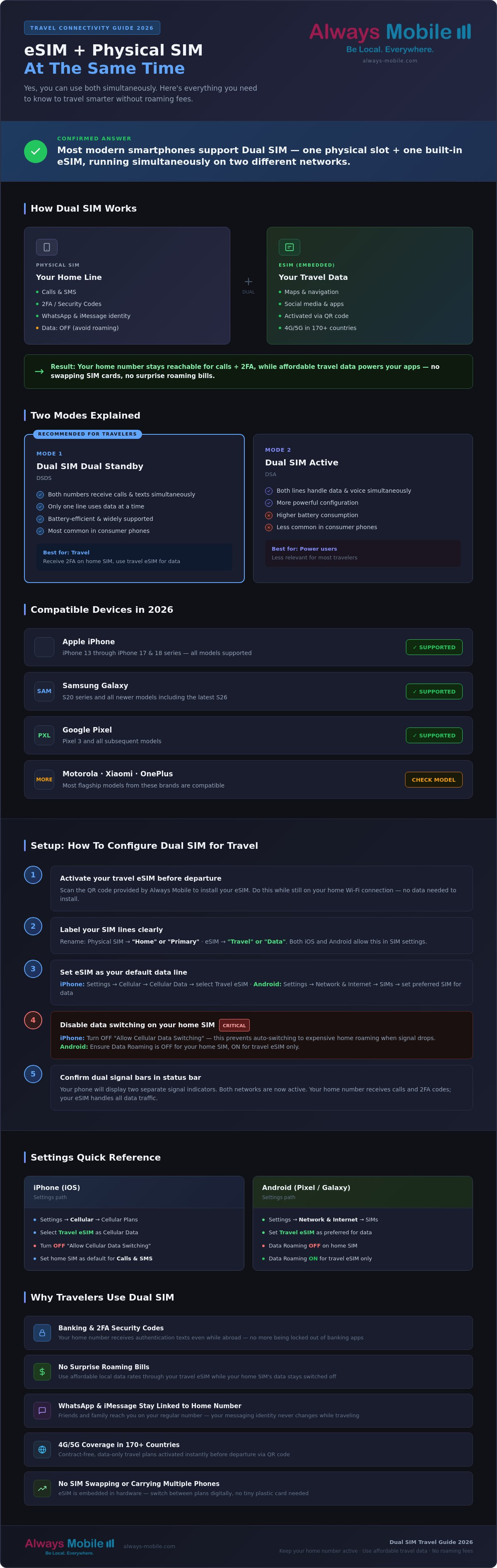
Paso a paso: Configurando tu configuración Dual SIM para viajar
Configurar una Dual SIM es sencillo una vez que entiendes la secuencia. El objetivo es llegar con tus datos listos. Si te has estado preguntando ¿puedo usar eSIM y SIM física al mismo tiempo?, aquí es donde la teoría se convierte en práctica. Gestionarás tu tarjeta física y tu perfil digital a través del menú de configuración de tu teléfono sin necesidad de tocar una herramienta SIM. Es un proceso limpio y digital que elimina el estrés de manipular pequeños hardware mientras estás en movimiento.
Antes de volar: Instalación
La preparación es clave para una llegada sin problemas. Compra tu plan por destino mientras aún tengas una conexión Wi-Fi estable en casa. Esto evita la frustración de intentar encontrar una señal en una concurrida terminal de aeropuerto. Sigue estos pasos para preparar tu dispositivo:
-
Escanea el código QR proporcionado en tu correo electrónico de confirmación o ingresa los detalles manualmente en la configuración de tu teléfono móvil.
-
Etiqueta la nueva línea inmediatamente. Usa "Always Mobile" o "Viaje" para mantenerla organizada y distinguirla de tu número de casa.
-
Mantén la línea de viaje "Desactivada" hasta que llegues a tu destino. Esto preserva la validez del plan y evita que tu teléfono busque una red a la que aún no puede llegar.
Completar estos pasos en casa significa que has hecho el trabajo pesado. Tu teléfono ahora está precargado con las credenciales necesarias para conectarse a una red local en el momento en que aterrices.
A la llegada: Activación
Una vez que el avión aterriza, es hora de cambiar. Esta parte del proceso asegura que uses la red correcta para los datos mientras mantienes tu número de casa localizable para 2FA y llamadas. Es el último paso para responder ¿puedo usar eSIM y SIM física al mismo tiempo para un viaje exitoso? Sigue esta lista de verificación:
-
Navega a la configuración de tu celular y activa tu línea de viaje.
-
Establece "Datos móviles" en tu eSIM de viaje. Esto le indica a tu teléfono que use la línea secundaria para todo el tráfico de internet.
-
Activa la "Itinerancia de datos" solo para la línea de viaje. Esto permite que la eSIM se conecte a las redes de socios locales en tu país de destino.
-
Verifica que tu SIM principal de casa tenga la "Itinerancia de datos" desactivada. Este es tu cortafuegos contra cargos de itinerancia accidentales de tu proveedor nacional.
Esta configuración dual permite que tu teléfono enrute el tráfico de manera inteligente. Verás dos barras de señal en tu barra de estado, confirmando que estás usando ambas redes con éxito. Si aún no has asegurado tus datos, compra tu eSIM de viaje ahora para asegurar una transición fluida en el momento en que aterrices.
Conectividad de viaje sin interrupciones con los planes de datos de Always Mobile
Always Mobile elimina la fricción de los viajes internacionales. Si te has estado preguntando ¿puedo usar eSIM y SIM física al mismo tiempo?, nuestro servicio ofrece la solución definitiva. Ofrecemos una línea de datos secundaria que funciona en perfecta armonía con tu SIM física principal. Esta configuración garantiza que te mantengas conectado a casa mientras disfrutas de datos locales de alta velocidad. Con cobertura en más de 170 países, eliminamos la necesidad de buscar tarjetas SIM locales o lidiar con la inseguridad de las redes Wi-Fi públicas. Obtienes conectividad inmediata sin las barreras tradicionales.
Nuestros planes son estrictamente prepago y solo de datos. Esto significa que nunca tendrás que preocuparte por contratos, verificaciones de crédito o tarifas ocultas. Obtienes exactamente lo que pagas: datos 4G o 5G instantáneos directamente en tu dispositivo. Este es el compañero ideal para las funciones de voz y SMS de tu SIM física. Mantienes tu número de casa activo para esos códigos 2FA esenciales y llamadas familiares. Mientras tanto, Always Mobile se encarga de las tareas de gran ancho de banda, como la navegación y el streaming. Puedes responder fácilmente a la pregunta, ¿puedo usar eSIM y SIM física al mismo tiempo?, simplemente activando tu plan y viendo aparecer ambas barras de señal en tu pantalla.
¿Por qué elegir Always Mobile para tu línea secundaria?
La fiabilidad es el núcleo de nuestro servicio. Nos asociamos con redes locales de primer nivel en cada destino para garantizar que tengas las velocidades más rápidas posibles. La activación instantánea significa que estás conectado en el momento en que las ruedas del avión tocan la pista. No se requiere el intercambio físico de SIM. Esto elimina el riesgo de perder tu pequeña tarjeta SIM de casa mientras viajas. Para aquellos con itinerarios complejos, nuestros planes de eSIM global ofrecen la máxima flexibilidad. Puedes moverte entre países y continentes sin necesidad de actualizar tu configuración o comprar un nuevo plan. Es una experiencia perfecta diseñada para el viajero moderno.
Empezando con tu SIM digital
¿Listo para experimentar una conectividad sin esfuerzo? Explora nuestra colección de planes por destino para encontrar el ajuste perfecto para tu próximo viaje. Ofrecemos planes locales para países individuales, planes regionales para continentes enteros y planes globales para aquellos que cruzan varias fronteras. El proceso es rápido y lógico. Elige tu plan, recibe tu código QR e instálalo antes de partir. Si tu viaje dura más de lo esperado, utiliza nuestras sencillas opciones de recarga para añadir más datos en segundos. Para una mirada más profunda a la tecnología, lee nuestra guía completa sobre qué es una tarjeta eSIM. Proporcionamos todas las herramientas que necesitas para dominar la conectividad digital en 2026.
Domina tu conectividad global
Viajar en 2026 no debería implicar estrés técnico ni altas facturas de roaming. La pregunta de ¿puedo usar eSIM y SIM física al mismo tiempo? ahora tiene una solución práctica que te mantiene conectado. Esta configuración protege tu número principal para códigos de 2FA y mantiene tus aplicaciones de mensajería vinculadas a tus contactos de casa. Siguiendo los sencillos pasos de configuración para tu iPhone o Android, conviertes tu dispositivo en una potente herramienta global. Obtienes el beneficio de las velocidades de datos locales sin perder tu identidad de casa.
No tienes que elegir entre estar localizable y mantenerte dentro del presupuesto. Always Mobile te proporciona los datos que necesitas sin las tarifas ocultas de los operadores tradicionales. Disfruta de una entrega instantánea por correo electrónico y de la tranquilidad que ofrece el soporte de viaje 24/7. Te garantizamos que no tendrás tarifas de roaming cuando utilices nuestros planes específicos para cada destino. Es la forma eficiente de gestionar tu vida digital a través de las fronteras.
Obtén tu eSIM de viaje de Always Mobile y mantente conectado hoy mismo. Tu viaje se trata de experiencias, no de configuraciones de red. Viaja con confianza sabiendo que tienes lo mejor de ambos mundos en tu bolsillo.
Preguntas frecuentes
¿Usar una eSIM y una SIM física al mismo tiempo agotará mi batería?
Ejecutar dos redes simultáneamente consume un poco más de energía porque su teléfono se comunica con dos torres diferentes. Sin embargo, el hardware moderno está altamente optimizado para el modo Dual SIM Dual Standby (DSDS). Descubrirá que el impacto en la duración diaria de su batería es marginal y rara vez se nota durante el uso típico de viaje.
¿Puedo usar dos eSIM en lugar de una física y una eSIM?
Puede usar dos eSIM activas a la vez en la mayoría de los dispositivos insignia lanzados después de 2022. Esto incluye el iPhone 13 hasta el último iPhone 18 y los modelos recientes de Samsung Galaxy o Google Pixel. Si su teléfono admite múltiples eSIM activas, simplemente puede apagar su SIM física y ejecutar dos perfiles digitales en su lugar.
¿Necesito desbloquear mi teléfono para usar una eSIM de Always Mobile con mi SIM física?
Su teléfono debe estar desbloqueado por el operador para usar una eSIM de Always Mobile junto con su SIM física principal. Si actualmente tiene un plan de pago mensual, su operador puede haber bloqueado el dispositivo a su red. Comuníquese con su proveedor para solicitar un desbloqueo antes de partir para asegurarse de que su teléfono acepte una línea de datos secundaria.
¿Qué sucede con mi número de WhatsApp si uso una eSIM de viaje?
Su número de WhatsApp permanece exactamente igual. La aplicación lo identifica por su número de cuenta original, incluso cuando su teléfono usa una eSIM de viaje para datos. Esta es una razón clave por la que los viajeros preguntan, ¿puedo usar esim y sim física al mismo tiempo; les permite navegar por la web mientras mantienen su identidad de chat intacta.
¿Puedo recibir llamadas en mi número de casa mientras uso datos de eSIM?
Puede recibir llamadas y SMS en su número de casa mientras su eSIM proporciona datos para sus aplicaciones. Ambas líneas permanecen activas en segundo plano. Solo recuerde que su operador de origen puede cobrarle por las llamadas entrantes o los minutos utilizados mientras se encuentre fuera de su área de cobertura nacional.
¿Cómo me aseguro de no tener cargos de roaming en mi SIM física?
Vaya a la configuración de su red celular y desactive la "Itinerancia de datos" para su línea SIM física. Establezca su eSIM de viaje como la fuente designada para "Datos celulares". Esto crea una barrera digital que evita que su operador de origen le facture por el costoso uso de datos en segundo plano mientras está en el extranjero.
¿Puedo usar 5G tanto en la SIM física como en la eSIM simultáneamente?
La mayoría de los teléfonos inteligentes insignia en 2026 admiten 5G tanto en la SIM física como en las líneas eSIM. Esto depende del hardware específico de su dispositivo y de la infraestructura de red local en su destino. Si ambas redes ofrecen 5G, su teléfono mostrará el icono 5G para la línea que esté activa en ese momento.
¿Qué debo hacer si mi teléfono no tiene una ranura para eSIM?
Si su dispositivo carece de hardware eSIM, no podrá usar un plan de datos digital. Deberá depender de una SIM física de viaje o de las opciones de roaming de su operador de origen. Si aún se pregunta ¿puedo usar esim y sim física al mismo tiempo, verifique la configuración de su dispositivo para ver si existe una opción de "Agregar eSIM".