

What if your flagship smartphone is technically capable of global roaming, but a hidden carrier lock or regional hardware quirk renders it useless the moment you land? Buying a data plan only to find it won't activate is a traveler's worst nightmare. With the 2026 shift toward eSIM-only devices in the US market, identifying esim compatible phones is no longer optional. It's the difference between instant connectivity and a frantic search for expensive airport Wi-Fi.
You probably feel overwhelmed by technical jargon like EID numbers, IMEI codes, and complex carrier restrictions. We understand the frustration of wanting a simple "yes" or "no" before you purchase a plan. This guide cuts through the noise to help you verify your device's status with confidence. You'll learn exactly how to check your hardware compatibility and confirm your carrier's lock status in seconds.
By the end of this checklist, you'll know if your phone is ready for a Local, Regional, or Global eSIM plan. We provide a clear roadmap to ensure your 2026 travels are defined by seamless data, not technical hurdles. Let's confirm your compatibility so you can focus on the journey ahead.
Key Takeaways
- Dial *#06# to locate your device EID and confirm digital SIM support instantly.
- Understand the 2026 shift toward eSIM-only flagships and how it simplifies your travel connectivity.
- Identify why some esim compatible phones fail due to regional hardware restrictions in specific Asian markets.
- Verify your carrier-unlocked status to ensure your device is ready for a Local or Global eSIM plan.
- Master the five-point framework for a successful, friction-free activation before you board your flight.
Table of Contents
-
Why Your Compatible Phone Might Still Fail (And How to Fix It)
-
Activating Your Travel Data: Next Steps for Compatible Devices
The 2026 eSIM Landscape: Is Your Device Ready?
Mobile connectivity reached a definitive turning point in 2026. The physical SIM card, once a staple of every phone purchase, has become a legacy technology. If you're carrying a modern flagship, you're likely holding one of the many esim compatible phones designed to function without a plastic chip. This transition isn't just about saving space inside the phone. It's about a global shift toward eSIM technology that prioritizes instant, digital-first activation. For a deep dive into the basics, you can read our guide on what is an esim card to understand the underlying hardware. The latest GSMA specifications, such as SGP.22 v3.1, ensure that these devices are more reliable and easier to manage than ever before.
The Shift from Physical to Digital SIMs
The SIM tray is disappearing. Apple led the charge by removing physical slots from US-market iPhones starting with the iPhone 14, and by 2026, most major manufacturers have followed suit for their flagship models. This change offers significant benefits for durability and security. When comparing esim vs physical sim, the digital version wins on resilience. There are no moving parts to break and no physical card for a thief to swap. It's also an environmental victory. The industry is moving away from billions of plastic cards that eventually end up in landfills. In Europe, eSIM-enabled devices now constitute a massive portion of smartphone shipments, a number that continues to climb as older hardware is phased out.
Why Travelers Need an eSIM-Compatible Device
International travel used to involve a frantic search for a local kiosk or a paperclip to swap SIM cards. Those days are over. With esim compatible phones, you can switch between networks with a few taps. You don't have to worry about losing your home SIM card while it's taped to the back of your passport. It stays safely inside your phone's software. Always Mobile leverages this technology to deliver 4G and 5G data the moment you land. Whether you need a Local, Regional, or Global plan, the activation happens through a QR code or an app.
Using a digital SIM also provides a safety net. If your phone is stolen, the eSIM cannot be physically removed; this makes the device easier to track and harder for thieves to use. Modern devices can store between 8 to 10 different profiles, allowing you to keep your home number active while using a Daily Unlimited eSIM Plan for your holiday data. It's fast. It's efficient. It ensures you stay connected without the traditional barriers of physical hardware.
The Universal eSIM Compatibility Checklist
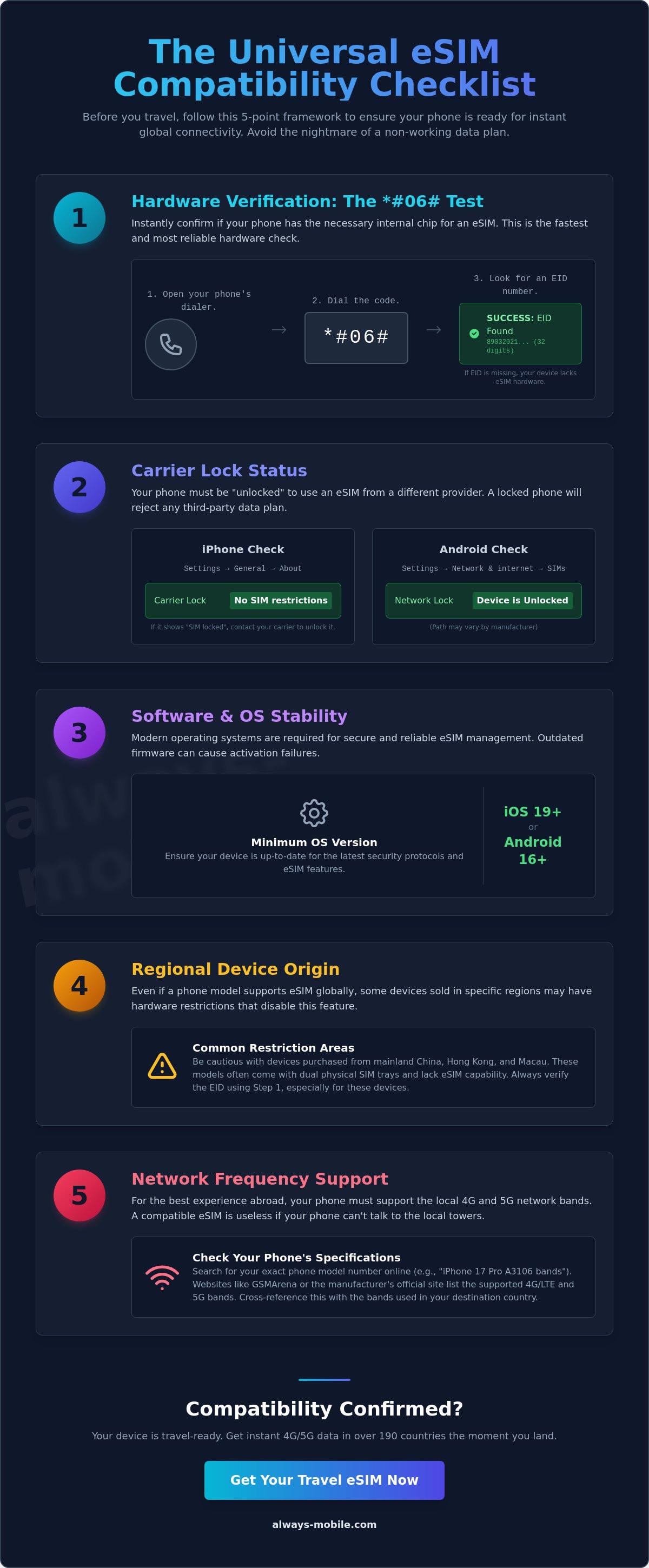
Verification is the single most important step before you travel. Don't assume your device is ready just because it's a newer model. Technical barriers like carrier locks or outdated firmware can stall your activation at the airport. To ensure a friction-free experience, follow this 5-point verification framework for esim compatible phones. This checklist covers hardware presence, software stability, carrier status, regional origin, and network frequency support. By confirming these details now, you eliminate the fear of buying a plan that won't activate.
Operating system stability is vital in 2026. Ensure your device is running at least iOS 19 or Android 16. These versions include the latest protocols for managing multiple digital profiles and addressing known eSIM security risks identified by cybersecurity experts. Modern firmware doesn't just provide new features; it ensures the handshake between your phone and a global network is secure and instantaneous.
Step 1: The *#06# Technical Verification
Open your phone's dialer app. Type *#06# as if you were making a call. A screen will immediately pop up with several barcodes and identification numbers. Look specifically for a 32-digit string labeled "EID." The EID is the digital fingerprint of an eSIM chip. If this number is missing, your device lacks the physical internal hardware required for digital SIM technology. This method is the fastest way to verify hardware presence without digging through complex sub-menus. If you see the EID, your hardware is capable of supporting a digital plan.
Step 2: Checking Carrier Lock Status
Hardware capability is only half the battle. Your phone must also be "carrier-unlocked" to accept a third-party data plan. On an iPhone, navigate to Settings, tap General, and then tap About. Scroll down to "Carrier Lock." If it says "No SIM restrictions," you're ready to go. On Android devices, this status is often found under "Connections" or "Network & Internet" within the system settings. Look for "Network Lock" or "Service Provider Lock."
A compatible phone cannot successfully activate a local esim plan if it's still tied to a specific provider's contract. If your device is locked, contact your home carrier to request an unlock before you depart.
If your phone is an employer-provided device you may need to check your employer's eSIM policy as some restrict eSIM use in their devices.
Once you've confirmed your phone is both compatible and unlocked, you can confidently select a data package from Always Mobile to stay connected throughout your trip.
The Complete Directory of eSIM Compatible Phones in 2026
The market for esim compatible phones has expanded significantly over the last few years. By early 2026, nearly all flagship and mid-range devices adhere to the latest GSMA eSIM standards. These technical specifications ensure your device connects to local networks across the globe without physical hardware swaps. Most modern smartphones now store between 8 and 10 digital profiles. This allows you to keep your home line active while rotating through multiple travel plans as you cross borders. Use this directory to confirm if your current hardware is ready for a digital-first travel experience.
Apple iPhone & iPad Compatibility
Apple remains a primary driver of digital SIM adoption. Every iPhone model from the iPhone XS through the latest iPhone 17 series supports eSIM technology. If you purchased an iPhone 14, 15, 16, or 17 in the United States, your device is eSIM-only. It has no physical SIM tray at all. For tablet users, any iPad with "Cellular" capability released from 2019 onwards is compatible. This includes the iPad Pro, iPad Air, and the standard iPad. The iPhone 13 and all subsequent models also support dual-eSIM functionality. You can run two digital plans simultaneously without needing a physical card for either slot.
Samsung Galaxy & Google Pixel Series
Samsung and Google offer robust support across their entire 2026 lineups. The Samsung Galaxy S20 through the S26 Ultra all feature digital SIM chips. This support extends to the Z Fold and Z Flip foldable series. Samsung devices utilize a helpful feature called "Auto Data Switching." This allows the phone to automatically use your secondary travel plan for data if your primary line loses coverage. Google Pixel users are also well-covered. Support begins with the Pixel 3 and continues through to the Pixel 10. Budget-conscious travelers can find excellent esim compatible phones in the Samsung Galaxy A25 or the Google Pixel 7a. Both offer flagship-level connectivity at a lower price point.
Other Android Manufacturers (Xiaomi, Motorola, Oppo)
Digital SIM technology is no longer exclusive to the biggest global brands. Motorola's Razr and Edge series provide excellent eSIM integration for those who prefer alternative hardware. Xiaomi users can rely on models ranging from the 12T to the 15 Pro. Oppo's Find X series also remains a top choice for international travelers. By 2026, even entry-level Android models are adopting digital SIM slots to meet consumer demand for flexible data. Always check your specific model number before you depart. Some regional variants manufactured for China or Hong Kong may still rely on dual physical slots instead of the embedded chip found in international models.
You can see our Device Compatibility list here .
Why Your Compatible Phone Might Still Fail (And How to Fix It)
You've confirmed your model is on the list, yet the activation fails. This is a common frustration for travelers who assume hardware compatibility is the only requirement. Identifying esim compatible phones is usually straightforward, but regional manufacturing and software locks can create hidden barriers. If your phone refuses to recognize a new digital plan, the issue likely stems from where you bought the device or how your home carrier manages its network permissions. Most activation errors are solvable, provided you know where to look in your settings.
Software modifications can also block digital SIM functionality. If you've "rooted" your Android device or "jailbroken" your iPhone, the security protocols required for eSIM installation may be compromised. Most travel networks require a secure, unmodified environment to download the digital profile. If your phone is modified, you'll likely need to restore it to factory settings before the activation will succeed.
The Mainland China Hardware Restriction
Regional hardware variances are the most overlooked obstacle. iPhones manufactured for Mainland China, Hong Kong, and Macao often lack an internal eSIM chip entirely. Instead, these models feature a dual physical nano-SIM tray. Even though the software might look identical to a US or European model, the physical hardware required for a digital plan simply isn't there. To identify the origin of your device, go to Settings, tap General, and then tap About. Look at your Model Number. If the two letters before the slash are CH (China), ZP (Hong Kong), or ZA (Macao), your device likely relies on physical slots only. If you accidentally purchased one of these variants, you won't be able to use digital SIM technology.
Carrier Unlocking: The Final Hurdle
A common misconception is that a "paid off" phone is automatically an "unlocked" phone. This isn't true. Even if you've completed your contract, many carriers keep a software lock on the device until you specifically request its removal. This lock prevents the phone from accepting any network signal other than your home provider. You must contact your carrier and ask them to "push" the unlock command to your device. This process can take anywhere from a few minutes to two business days, so handle it before you head to the airport.
If you're still seeing a "SIM Not Supported" message after checking these steps, it's time for a professional diagnosis. The support team at Always Mobile can help you determine if the issue is a carrier lock or a regional hardware limitation. Once your device is truly free, you can buy a Regional or Global eSIM plan and get connected instantly.
Quick troubleshooting steps for activation errors:
-
Toggle Airplane Mode on and off to reset the network search.
-
Ensure you're connected to a stable Wi-Fi network during the download.
-
Check that your OS is updated to the latest version (iOS 19 or Android 16).
-
Verify that "No SIM Restrictions" appears in your device's About menu.
Activating Your Travel Data: Next Steps for Compatible Devices
Your checklist is complete. You've confirmed your hardware is ready and your carrier has released the lock. Now comes the transition from preparation to action. The true power of esim compatible phones lies in the ability to secure data before you even pack your bags. Waiting until you arrive at a foreign airport to find a Wi-Fi signal is a risk you don't need to take. By setting up your connection now, you ensure that your maps, translation apps, and ride-share services work the moment the plane wheels touch the tarmac.
Taking care of your connectivity early provides immediate relief. We recommend a "test install" at home. This allows you to verify that the digital profile sits correctly on your device. You can learn the specifics of how to use esim for international travel to maximize your battery life and avoid unexpected roaming charges from your home carrier. This proactive approach turns a technical task into a seamless part of your travel routine.
Choosing Your Always Mobile Plan
Select a plan that matches your itinerary. If you're staying within one country, a Local eSIM Plan is the most efficient choice. For those crossing multiple borders in Europe or Asia, a Regional plan offers better value. If your journey spans several continents, a global esim package provides a single solution for dozens of countries. Power users who rely on heavy video streaming or large file uploads should opt for Daily Unlimited eSIM Plans. Once you complete your purchase, your activation QR code arrives in your inbox instantly. There's no waiting for shipping and no physical waste.
Installation in Under 60 Seconds
Installation is straightforward. Open your phone's camera and scan the provided QR code. If you're using the same device to view the code, you can enter the activation details manually into your cellular settings. Follow the on-screen prompts to "Add Cellular Plan." Label your new profile as "Travel" or "Always Mobile" to keep it distinct from your primary line. This prevents confusion when you're managing your settings abroad.
Finalize the setup by adjusting your data preferences. Go to your cellular settings and set "Cellular Data" to your new travel profile. Ensure that "Data Roaming" is toggled to "On" for the travel eSIM but remains "Off" for your home SIM. This simple configuration ensures you use your affordable travel data while keeping your home number available for urgent texts or calls. Your esim compatible phones are now fully optimized for a stress-free 2026 travel experience.
Secure Your Global Connection Today
You now have the tools to verify your device status with precision. By checking your EID via *#06# and confirming your carrier's unlock status, you've removed the primary barriers to digital roaming. Remember that hardware origin matters. Identifying esim compatible phones correctly means avoiding regional variants that lack the necessary internal chip. These simple diagnostic steps ensure you don't waste time or money on a plan your device cannot support.
Eliminate the stress of traditional connectivity and high roaming fees. Always Mobile provides instant activation on over 170 networks worldwide. There is no physical SIM swapping required; just scan and connect. If you encounter a specific technical hurdle, our 24/7 technical support team is available to help resolve compatibility issues immediately. Experience the simplicity of a digital-first travel setup that moves as fast as you do.
Check our 170+ country plans for your compatible phone and lock in your data before you depart. Pack your bags with confidence. Your device is ready to keep you connected wherever your 2026 travels take you.
Frequently Asked Questions
Is the iPhone 17 compatible with eSIM?
Yes, the iPhone 17 series is fully compatible with eSIM technology. Following the transition that began with the iPhone 14, all US models of the iPhone 17 are eSIM-only and lack a physical SIM tray. These devices utilize the most recent GSMA standards to ensure fast, secure activation across global networks. You can store up to 10 profiles on these handsets for easy switching between different regions.
Can I use an eSIM if my phone is still on a contract?
Your ability to use an eSIM while on a contract depends entirely on your carrier's lock status. While the hardware may be compatible, most providers software-lock devices until they're fully paid off or a specific period has passed. You must contact your carrier to request an unlock. Once the "No SIM Restrictions" status appears in your settings, you can install any third-party travel data plan.
How do I know if my Android phone is carrier-locked?
Check your Android lock status by navigating to Settings and selecting "Connections" or "Network & Internet." Look for a section labeled "Network Lock" or "Service Provider Lock." If the status shows "Locked," your device won't accept a travel plan. This is a common hurdle for esim compatible phones purchased through monthly installments. An unlock request to your provider is necessary before you can activate new data.
Why does my iPhone from Hong Kong not support eSIM?
Hong Kong iPhones lack eSIM support because they're built with two physical SIM slots instead of an internal digital chip. This hardware configuration is specific to models manufactured for Mainland China, Hong Kong, and Macao. Even if your software is up to date, the physical hardware required for digital activation isn't present in these regional variants. Always check your model number to confirm your device's origin.
Does Always Mobile support the Samsung Galaxy S26?
Always Mobile fully supports the Samsung Galaxy S26 series for all our data plans. Whether you're using the standard S26, the S26+, or the S26 Ultra, our Local, Regional, and Global packages will activate instantly. Samsung's flagship hardware is designed for high-speed 5G connectivity, and our digital plans are optimized to leverage this hardware for a seamless, buffer-free experience while you travel.
Can I have multiple eSIMs on one compatible phone?
Most modern esim compatible phones allow you to store between 8 and 10 different digital profiles at once. While you can't use all of them simultaneously, you can have two active lines running at the same time on most flagship devices. This allows you to keep your home number active for emergency calls while using a separate travel plan for all your data needs.
What happens if I delete my eSIM profile by mistake?
Deleting an eSIM profile removes the plan from your device immediately. Unlike a physical card, you can't simply plug it back in. If this happens, you'll need to rescan the QR code to reinstall the eSIM in your phone. Always keep your activation QR code and order details handy in case you need to troubleshoot.
Do I need to turn off my physical SIM to use a travel eSIM?
You don't need to turn off your physical SIM to use a travel plan. Modern smartphones are designed for "Dual SIM, Dual Standby" functionality. This means both your home SIM and your travel eSIM can stay active at the same time. Simply go to your cellular settings and designate the travel eSIM as your primary source for data to avoid expensive roaming charges on your home line.